Conversions straight from Matomo. No pixels.
Conversions API sends your Matomo goals and ecommerce orders server-side to Google Ads, Meta, LinkedIn, X and Microsoft Advertising: with consent per platform, automatic click attribution and close to real time.
from €59/month · cancel any time
Latest v0.4.0 · Matomo ≥ 5.0.0
No pixels, no gaps
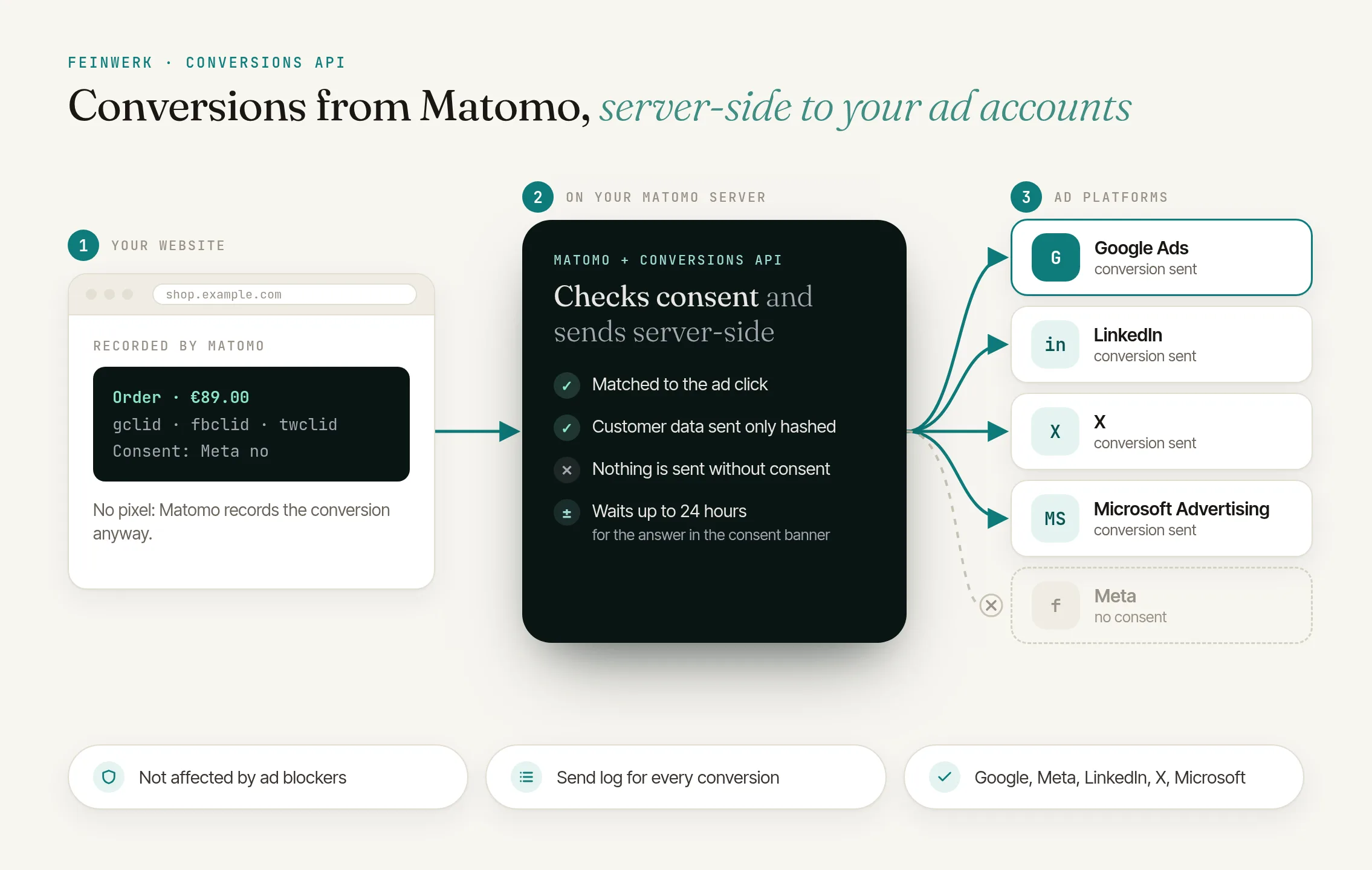
Matomo already records the conversion. Conversions API sends it straight to the ad platforms, so ad blockers and browser restrictions no longer swallow anything, and you need no extra tags on your website.
Clicks attributed automatically
The plugin detects ad clicks from Google (gclid, gbraid, wbraid), Meta (fbclid), LinkedIn (li_fat_id), X (twclid) and Microsoft (msclkid) and attributes later conversions, even after a login and across visits within your lookback window.
Consent per platform
Only what the visitor consented to is sent. The signal comes from your consent banner via Matomo Tag Manager, Google Consent Mode or the JavaScript API. Per website you choose the mode "Strict" or "External". If the visitor answers only after the conversion, it waits up to 24 hours for the decision.
Lean on data
Customer data is normalised and hashed in Matomo; plain text is never stored. IP address, user agent and hashes are deleted after sending, at the latest after 7 days, click IDs after 90 days.
Every transfer traceable
The send log shows what went to which platform and when, with the platforms' error messages, "Retry" and, for Google, the processing status. Expired access is detected and reported.
Click to enlarge
- License for 1 Matomo instance, all websites and users
- Prices incl. VAT, billed via Paddle
- 14-day trial, cancel before it ends at no cost
- Updates and support included
- Refunds
Report conversions from Matomo server-side to Google Ads, Meta and LinkedIn
Your campaigns learn from the conversions Matomo already records, server-side, with consent per platform and without extra pixels on your website.
Read the use case →Google Ads via the Data Manager API, Meta (Facebook and Instagram) via the Conversions API, LinkedIn via the Conversions API, X (Twitter) via the web conversions of the X Ads API and Microsoft Advertising (Bing) via the UET Conversions API. You can set up as many destinations per website as you like.
No. You pass consent, customer data and order ID via Matomo Tag Manager (_mtm) or Matomo's JavaScript API. If your website uses Google Tag Manager or Google Consent Mode, the plugin reads those entries as well.
Yes. When running both, the platforms deduplicate via a shared event ID: either the order ID or an ID your website passes to the pixel and to Matomo.
With the recommended cron job the plugin checks every minute what to send. For Google a delay of about 6 hours is preset, so that fresh clicks are already known to Google.
In the default mode "Strict" nothing is sent to a platform without consent. If the visitor answers the consent banner only after the conversion, the conversion waits up to 24 hours for the decision; without consent it is dropped and its data deleted. If the website owner ensures consent elsewhere, they can choose the mode "External" per website.
Matomo 5 with PHP 8.1 or newer, also for the command line that runs the cron job. The plugin supports Matomo's dark mode.
Administrators of a website find it under Administration → Websites → Conversions API and in the reports under Goals → Conversions API. There you set up destinations, check the send log and find the code for your website.
-
01
Download the Feinwerk connector and unzip it into your Matomo's
plugins/directory, then activate it. - 02 Open its settings and set the marketplace URL and your instance token.
- 03 Open the Feinwerk Plugins screen, find Conversions API, and click Install.
Prefer a manual install? After the purchase you will find the ZIP download in your customer account. · Documentation for Conversions API
Missing a feature in Conversions API? Tell us what you need →
Conversions API
Conversions API sends the conversions Matomo already records (goals and ecommerce orders) server-side to Google Ads, Meta, LinkedIn, X and Microsoft Advertising. You need no ad pixels on your website, and ad blockers or browser restrictions no longer distort your campaign figures.
How it works
Per website you set up one or more destinations and define which Matomo goals are sent as which conversion. Matomo records the conversion as usual; a background job sends it within a minute with the recommended cron job, for Google with an adjustable delay.
- Google Ads: Data Manager API, authentication via service account, clicks via gclid, gbraid and wbraid, processing status in the send log.
- Meta: Conversions API with event names such as Purchase or Lead, fbclid and the Meta cookies _fbp/_fbc.
- LinkedIn: Conversions API with conversion rules, clicks via li_fat_id.
- X (Twitter): web conversions of the X Ads API, sign-in with a pixel token or OAuth, clicks via twclid.
- Microsoft Advertising (Bing): UET Conversions API with the UET tag's token, clicks via msclkid. The plugin also reads Microsoft UET Consent Mode.
Consent first
Only what the visitor consented to is sent, per platform. Your consent banner passes the decision via Matomo Tag Manager, Google Consent Mode or the JavaScript API. If the visitor answers only after the conversion, for example for a goal reached on page view, the conversion waits up to 24 hours for the decision; a withdrawal stops everything not sent yet. Optionally your website passes customer data such as the email address; Matomo normalises and hashes it per platform, and plain text is never stored.
Full control
The send log shows every transfer with its status, the platforms' error messages and "Retry". Authentication errors pause a destination automatically, and super users are notified. Matomo's raw data deletion and GDPR tools cover the plugin's data. You find the plugin under Administration → Websites → Conversions API and in the reports under Goals → Conversions API, also in Matomo's dark mode.
-
v0.4.0 Oct 9, 2026
- Cookieless Matomo: settings, opt-out and limits feinwerk.io