
The Feinwerk Connector is now in the Matomo Marketplace. Install it right inside Matomo, no download, no FTP. Read the news · Here is how →
Plugins for Matomo, installed in one click.
Browse the Feinwerk catalog and install plugins straight into your Matomo via the Feinwerk connector, updates included.
Search Console · SSO/SAML · bot filtering · channel grouping · conversions
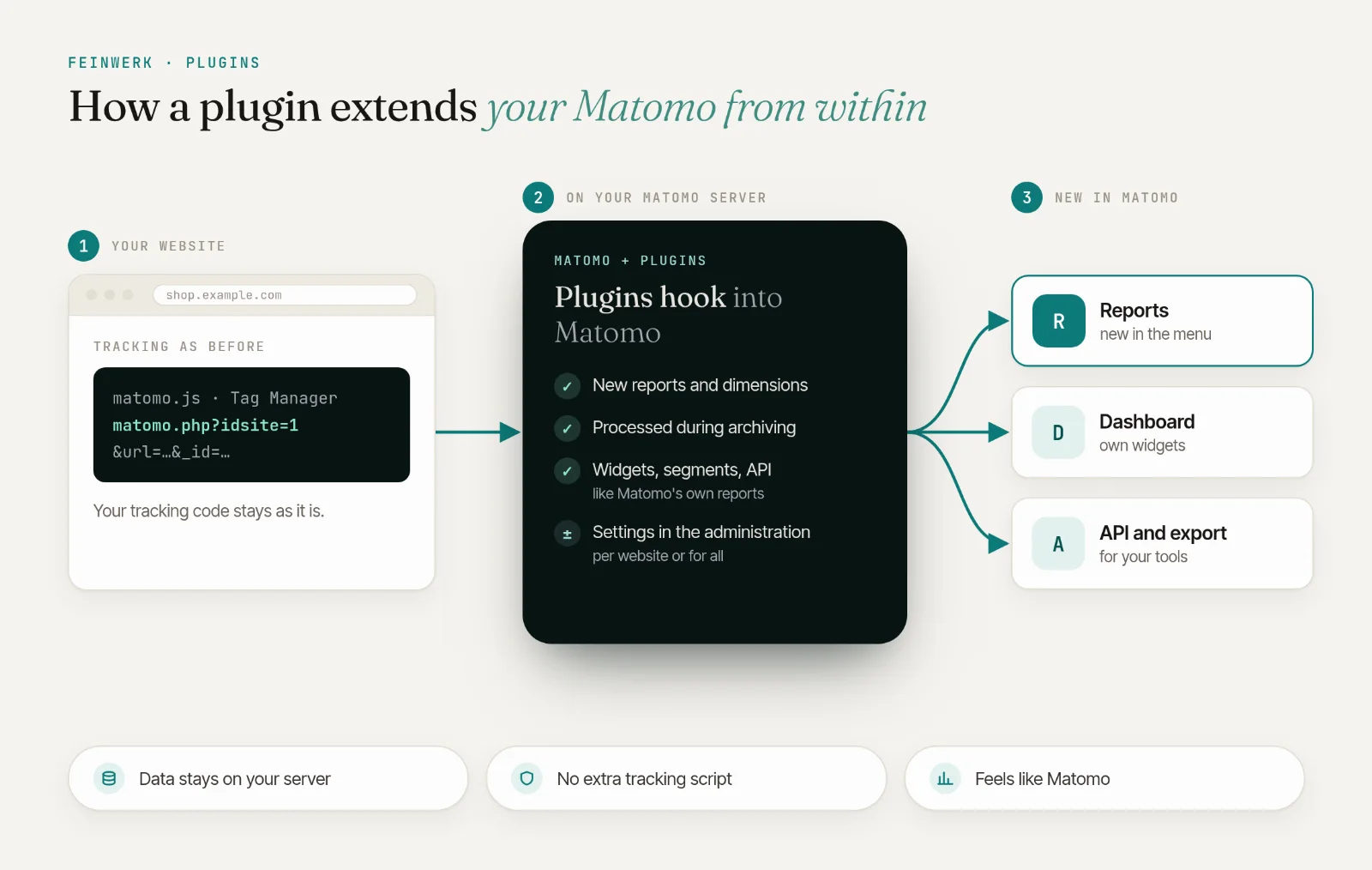
New to plugins? How extending Matomo works →Marketing & SEO
Where your visitors come from and what your campaigns achieve.
 Channel Grouping
from €59/month
Group hundreds of traffic sources into the marketing channels you actually steer: Organic, Paid, Email, Social or your own.
v5.0.2
View →
 Search Report
from €49/month
Search Report imports Google Search Console and Bing Webmaster Tools into native Matomo reports: daily, automatically, with unlimited history beyond Google's 16-month limit.
v5.0.2
View →
 Conversions API
from €59/month
Conversions API sends your Matomo goals and ecommerce orders server-side to Google Ads, Meta, LinkedIn, X, Microsoft Advertising and now also ChatGPT Ads and TikTok: with consent per platform, automatic click attribution and close to real time.
v5.6.1
View →
 Campaign Score
free
One score for clean campaign data: Campaign Score finds spelling variants, unusual mediums and missing values.
v5.4.0
View →
Tracking & data quality
Clean, complete data: detect bots, send tracking to several websites, delete faulty visits selectively.
 Tracking Spam Score
from €49/month
Spots bot traffic by how whole groups of visits behave, shows it per network and blocks it while tracking, server-side.
v5.0.2
View →
 Tracking Router
from €29/month
Keep every website in its own profile and add a shared profile with continuous sessions: one tracking request, copied on the server to the sites you allow.
v5.0.1
View →
 Delete Visits Filter
free
Pick websites, a date range and a Matomo segment, check the matches, then delete them, even millions of visits at once.
v5.0.3
View →
 Sentinel
free
Sentinel checks every website's data every hour and alerts you by email, Slack, Microsoft Teams or webhook as soon as tracking looks broken.
v5.1.2
View →
 Sentinel Pro
from €59/month
Sentinel Pro adds visit forecasts, public holidays and alarms per channel and conversion rate to the free Sentinel, plus a watchdog that speaks up when Sentinel itself stops.
v5.1.0
View →
Reports & dashboards
More from your data: paths to conversion, reports per website section and dashboards for your team.
 Visit Journey
from €59/month
A funnel with no presets: Visit Journey shows, for every goal and every order, which steps really came before it: pages, events, other goals and the channel the visit came through, as an interactive flow chart in Matomo.
v5.0.1
View →
 Email Reports Pro
from €59/month
Email Reports Pro turns your Matomo data into designed email reports: key figures with their trend, clear charts and tables that make even multi level reports readable. You put every report together from building blocks and see in the preview how the email arrives.
v5.1.0
View →
 Dashboard Segment
free
Give every dashboard widget its own view of your data: a segment and a time range per widget, with a dashboard-wide default that filters the whole dashboard.
v5.0.2
View →
 Dashboard Sharing
free
Share a Matomo dashboard with specific users or everyone who can see your websites. They get a read-only copy that updates itself every time they open it, instead of a one-off snapshot.
v5.0.1
View →
 Page Filter Report
free
Define sections by URL pattern once and get filtered Pages, Entry Pages, Exit Pages and Events reports for each, automatically.
v5.2.0
View →
 Data Exploration
free
Combine dimensions and metrics in one table, without creating a report and without waiting for archiving.
v5.0.1
View →
Access & security
Single sign-on and users that your identity provider creates automatically.
Your plugin is not here?
Tell us which feature you are missing in Matomo. Good ideas become new plugins and features.
- 01 Install the Feinwerk Connector from Matomo's Marketplace: under Administration › Platform › Marketplace, search for "Feinwerk", install and activate it. Without the Marketplace: download the ZIP.
- 02 Open Feinwerk Plugins and click Connect with Feinwerk account.
- 03 Install what you need with one click, updates included.
Plugins and operations from one source.
No time to run Matomo yourself? feinwerk.io operates your Matomo in German data centres, with all plugins, updates, backups and monitoring included.