Extend Matomo: what Plugins for Matomo do and how to install them
Matomo is the web analytics platform that runs on your own server. Visits, pages, goals, e-commerce, campaigns and a tag manager come built in, and your data stays with you. For much of what marketing teams need today, the core features are not enough, though: search terms from Google Search Console, conversions for Google Ads, your own marketing channels or signing in with the company account.
That is what Plugins for Matomo are for. This page explains what a plugin is, which gaps typical plugins close, what they cost and how to install them and keep them up to date.
What is a plugin for Matomo?
Matomo (called Piwik until 2018) is modular. Even Matomo's own reports are plugins. A plugin is a folder of PHP code in the plugins/ directory of your Matomo installation that you activate in the administration. From then on it hooks into Matomo: it adds new reports and dimensions, dashboard widgets, segments, API methods and settings in the administration.
Your tracking code stays exactly as it is. A plugin analyses the data Matomo collects anyway, or enriches it right on your server. No extra tracking script goes onto your website, and the data does not leave your server.
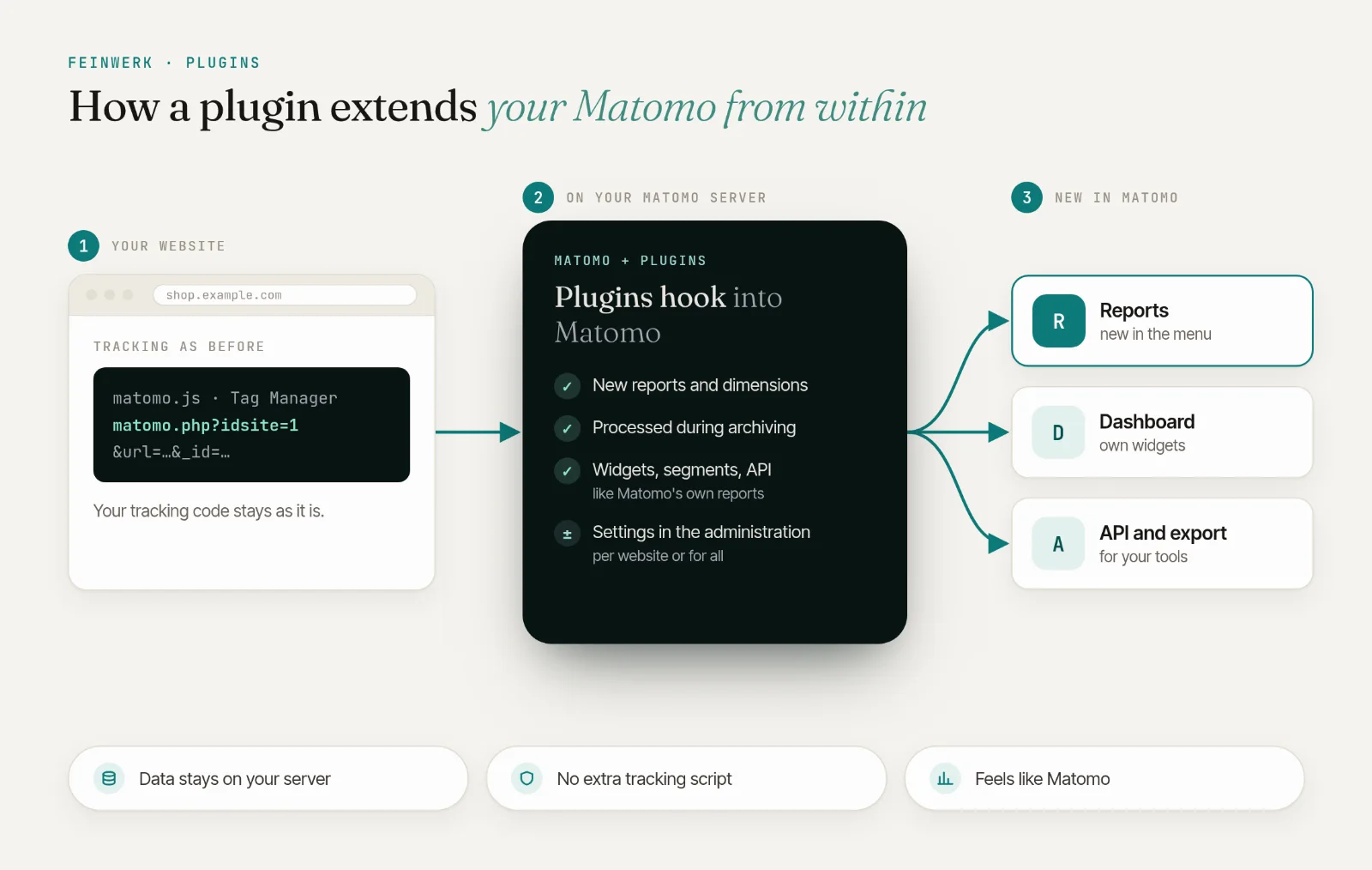
Plugins for Matomo come from two sources: Matomo's own Marketplace and specialised stores such as Feinwerk Plugins. Both work side by side in the same installation.
Matomo and Google Ads: reporting conversions to the ad platform
Matomo records which visits reach a goal or buy something. Google Ads sees none of it. For Google Ads bidding strategies to learn, the platform needs the conversions, and that usually means another tag on the website, often with its own consent in the cookie banner.
The Conversions API plugin takes the server route: it reports your Matomo goals and e-commerce orders directly to Google Ads, Meta, LinkedIn, X and Microsoft Advertising. It matches the ad click IDs automatically, only sends with consent per platform and needs no ad pixels on your pages.
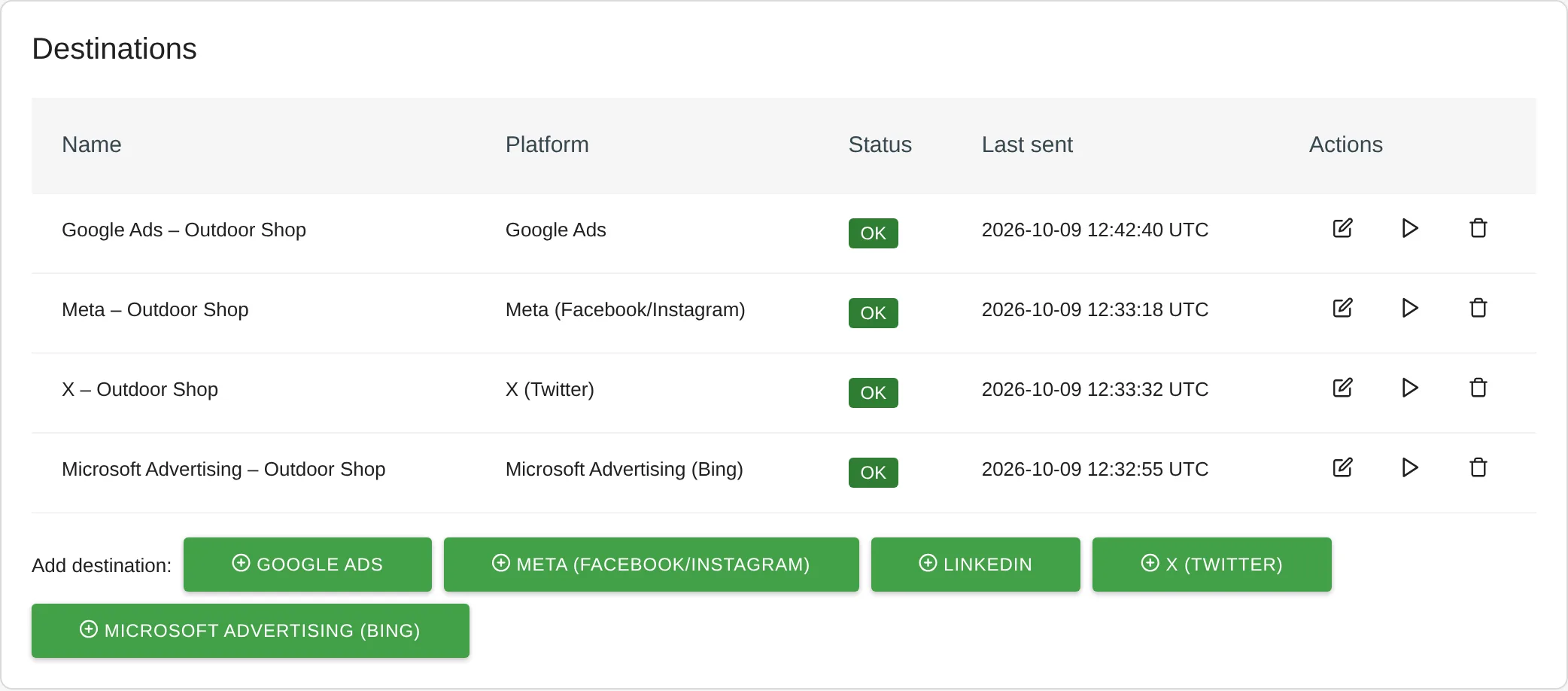
And in Matomo itself? There, ChannelGrouping shows which ad clicks brought visits, conversions and revenue. It recognises Google Ads clicks by their gclid even when the ad has no UTM parameters. More in the Conversions API use case.
Campaign tracking in Matomo: turning UTM parameters into marketing channels
Matomo tracks campaigns through parameters in the landing page URL, such as utm_source and utm_medium or Matomo's own mtm_ parameters. Matomo even offers a URL builder for them. In the reports, however, every visit with campaign parameters lands in the same channel type, Campaigns, whether it came from the newsletter, a search ad or a social ad.
ChannelGrouping groups referrers and campaigns by rules into the marketing channels your team works with: Paid Search, Paid Social, Email, Affiliates or your own. To start, there is a default grouping modelled on Google Analytics 4 with 19 channels and source lists for German-speaking markets. The report shows visits, conversions and revenue per channel.
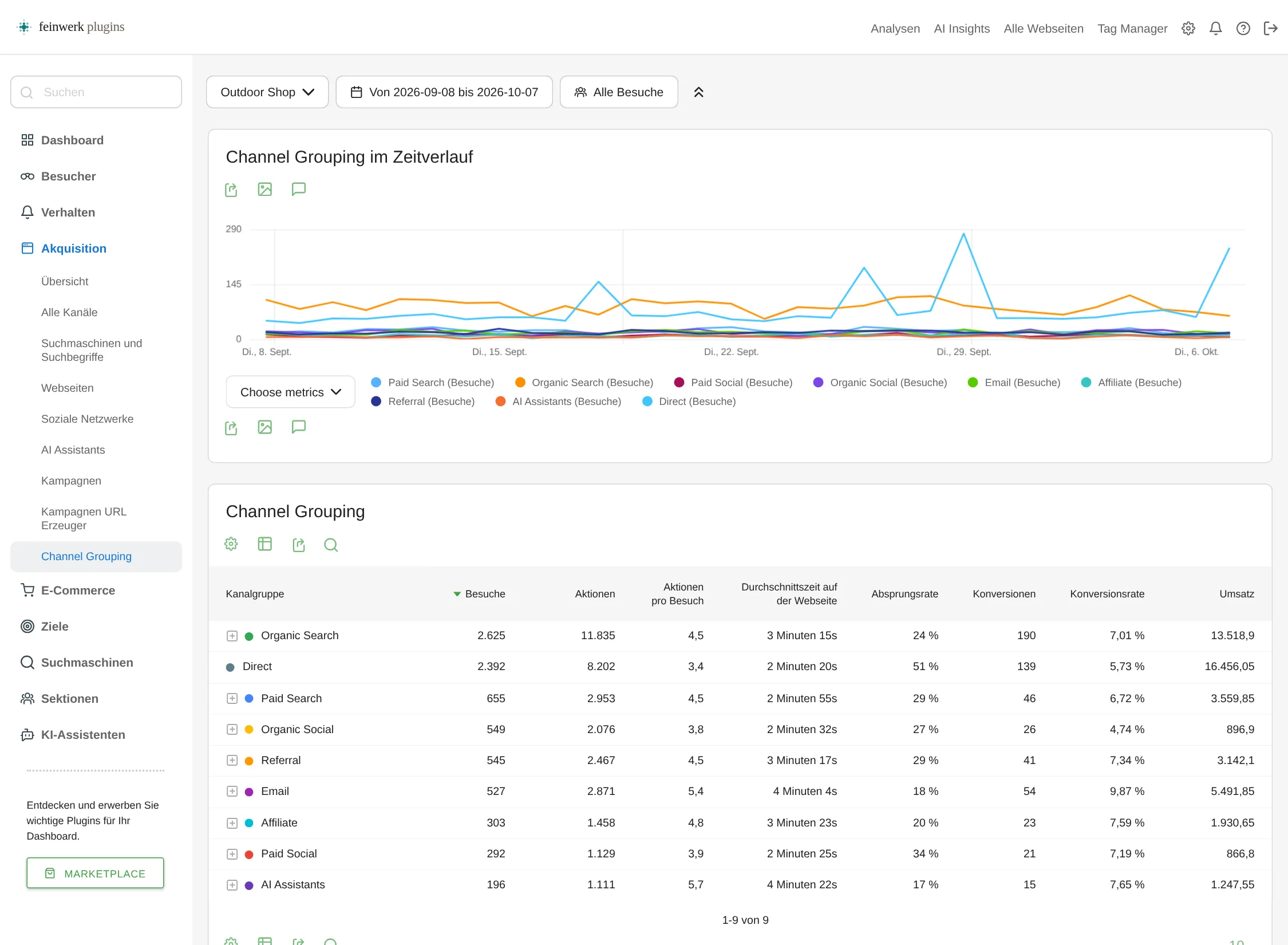
How to set up rules and test them before saving is covered in the marketing channels use case.
Matomo SEO: keywords from Google Search Console
Search terms from Google no longer arrive with the visit. That is why Matomo shows Keyword not defined for almost every visit from a search engine. Only Google Search Console knows the search terms, and it keeps data for 16 months at most.
SearchReport brings the data from Google Search Console and Bing Webmaster Tools into your Matomo as reports every day: keywords, clicks, impressions, click-through rate and position, plus estimated conversions per search term. The history stays in Matomo, beyond the 16 months too.
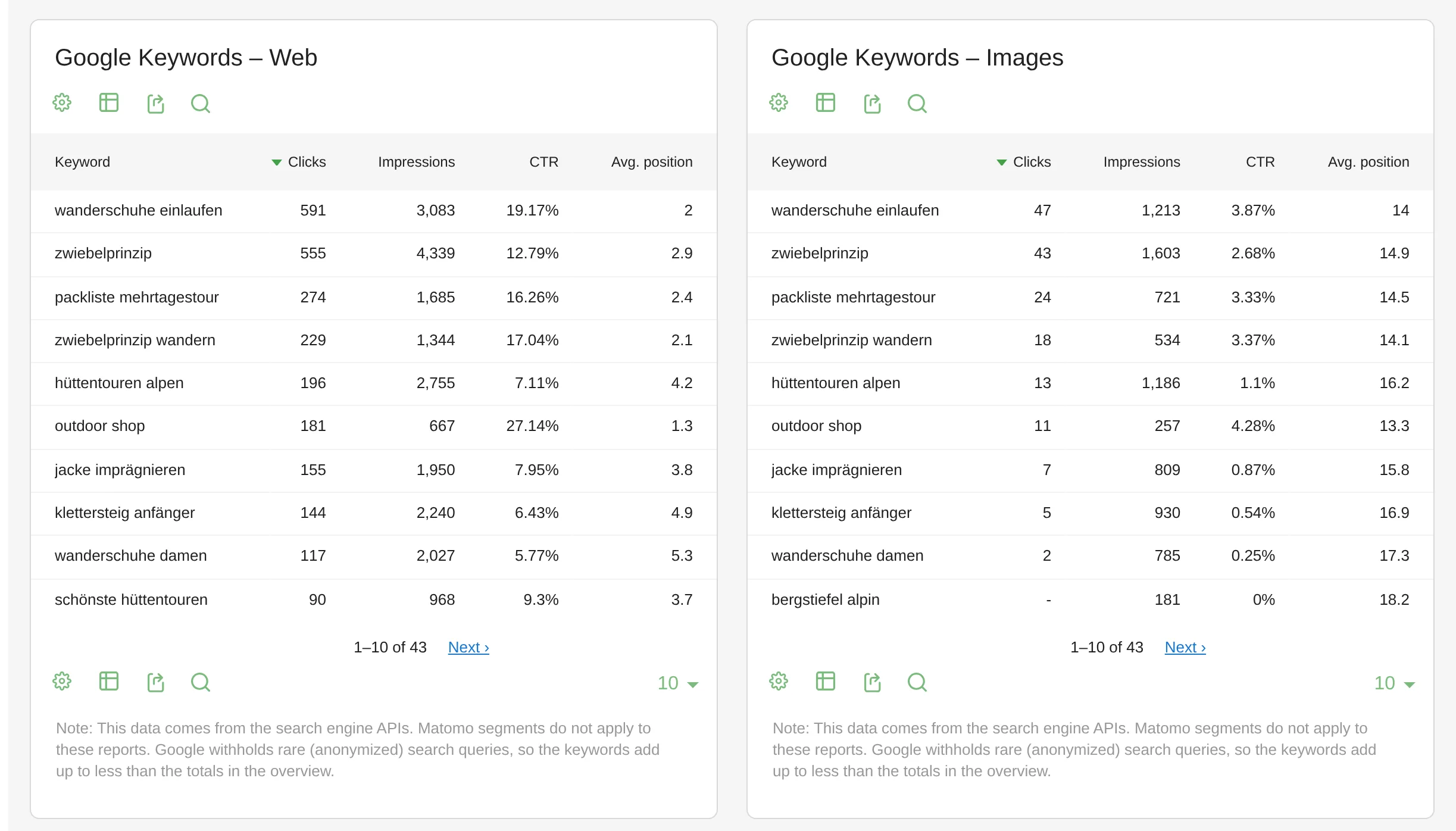
More in the Search Console in Matomo use case.
Bot traffic in Matomo: when the bounce rate suddenly climbs
Matomo recognises known bots by their user agent and leaves them out. Many bots pose as an ordinary browser, though. They load one page and leave, which pushes up the bounce rate and dilutes conversion rates and campaign figures.
TrackingSpamScore detects such traffic by the behaviour of whole groups of visits, shows it per network and, if you like, blocks it at tracking time. Bot visits already in your data can be removed with the free DeleteVisitsFilter: choose websites, period and segment, check the matches, delete.
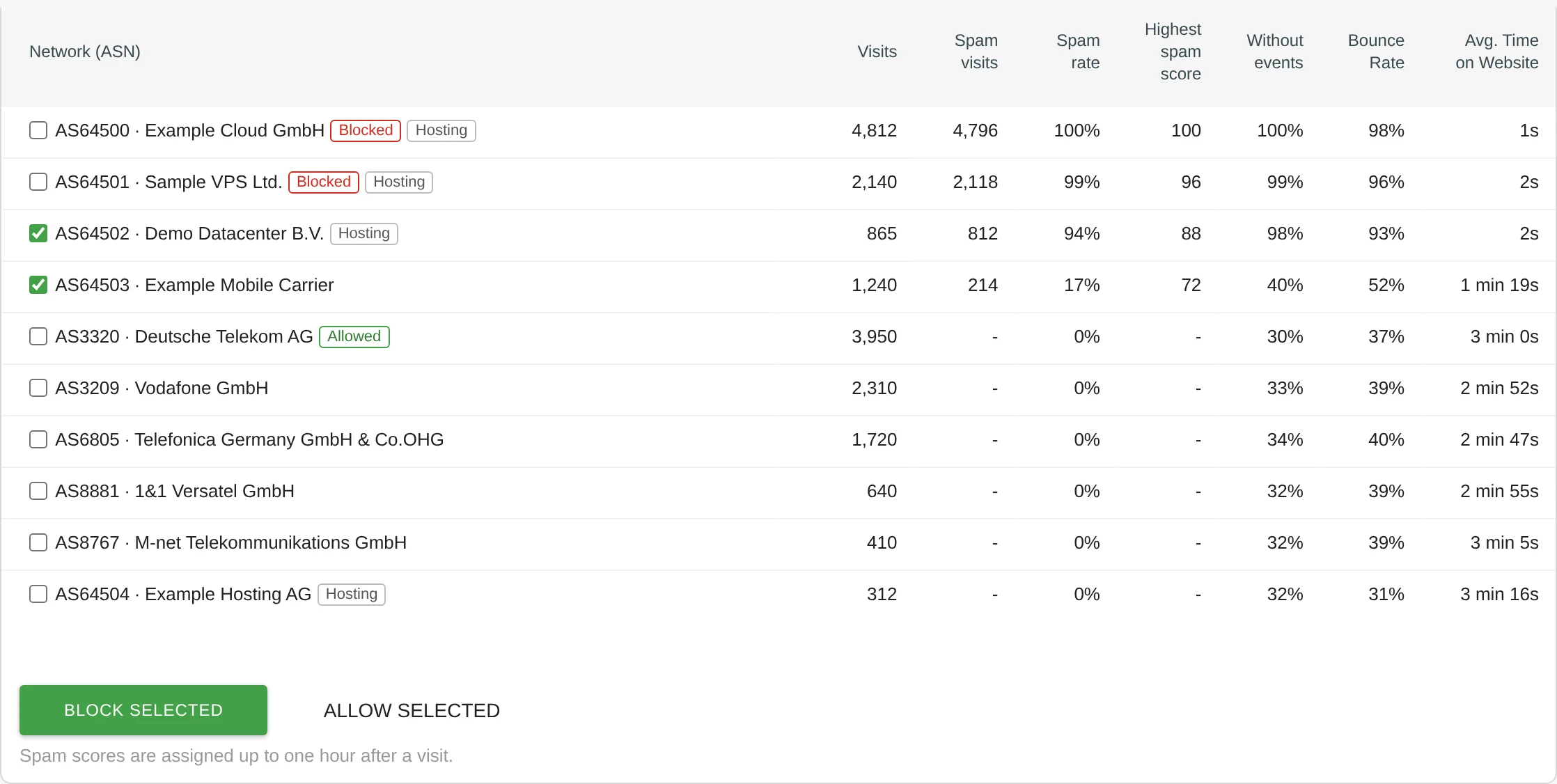
More in the bot traffic use case.
Matomo login with the company account: single sign-on
Out of the box, Matomo manages users and passwords itself. In a company that means one more password for everyone, accounts created by hand and deleted again when people leave.
With AuthSaml, your staff sign in via SAML 2.0 through your identity provider, such as Microsoft Entra ID (formerly Azure AD), Okta or Keycloak. Permissions in Matomo come from your identity provider's groups, and SCIM 2.0 creates and removes accounts automatically.
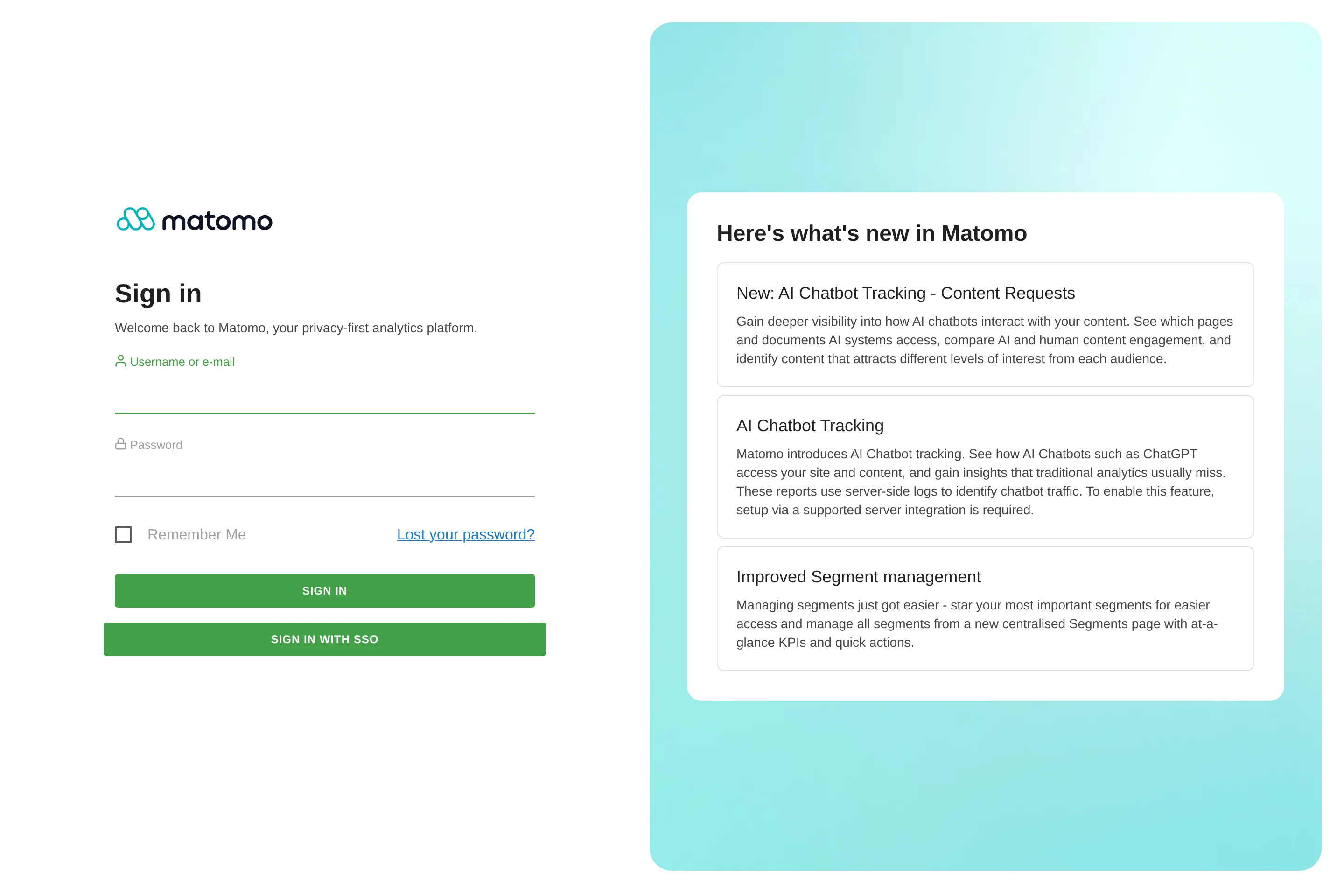
More in the single sign-on use case.
Matomo dashboard: a segment per widget, shared live
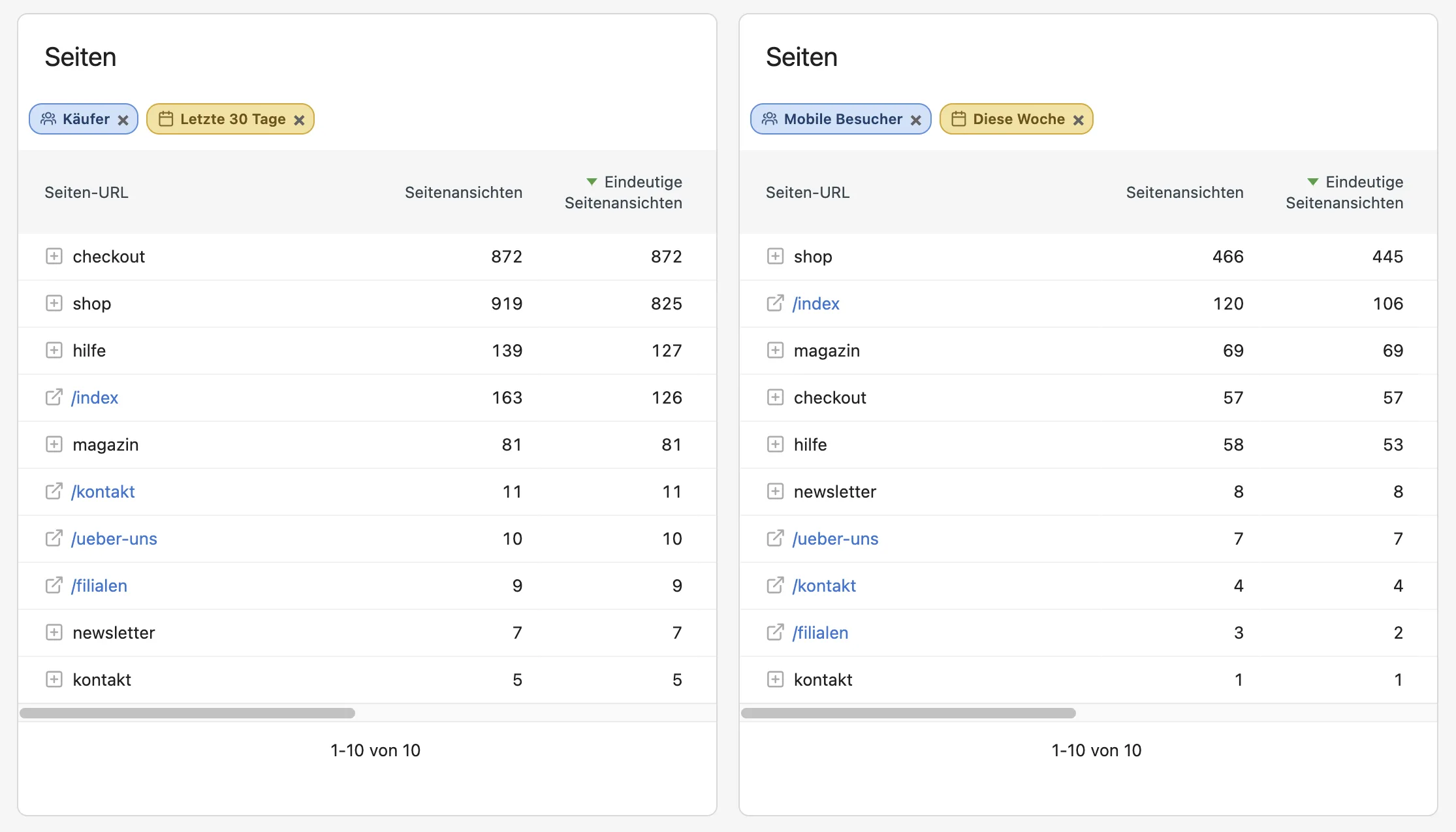
In Matomo a segment always applies to the whole dashboard. If you want to see buyers and all visitors side by side, you need two dashboards. And Copy dashboard to user hands out a copy that misses all your later changes.
The free DashboardSegment gives every widget its own segment and, if you like, its own period. You share dashboards live with selected users, so your team always sees your current version.
Analysing sections and several websites in Matomo
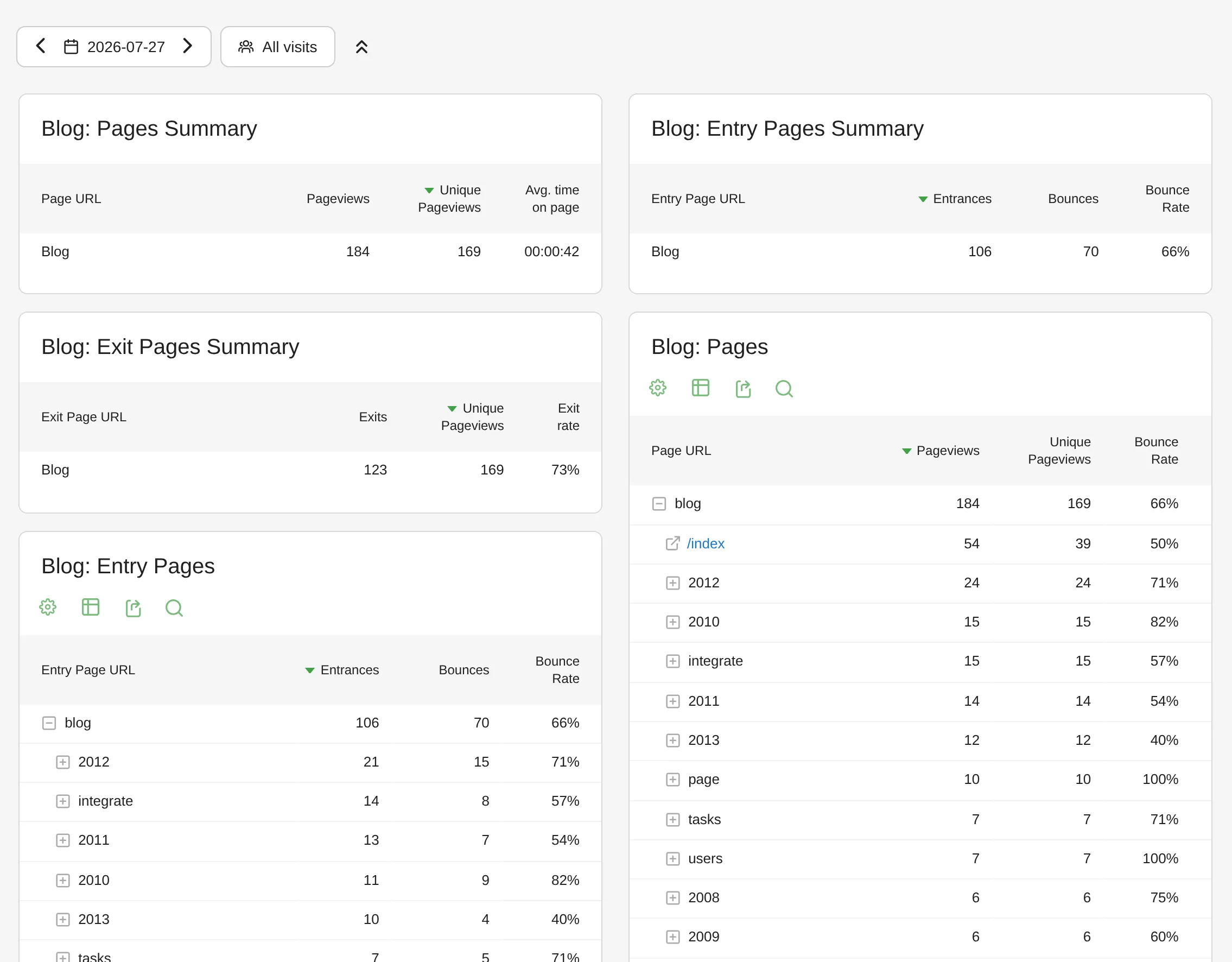
Analysing blog, shop and help separately means creating segments in Matomo and switching them by hand in every report. With the free PageFilterReport you define each section once by URL pattern and get its own page, entry, exit and event reports.
Analysing several websites together, with sessions across all of them, is what TrackingRouter does. It records one tracking request server-side in several websites of your Matomo, with a profile per website plus a shared profile, without a second tracker.
Installing and updating Plugins for Matomo
There are two ways to install a plugin:
- As a ZIP file. You download the file and install it by upload in the Matomo administration, via SFTP or on the command line. You repeat that by hand for every update.
- With one click from within Matomo. Plugins from the Matomo Marketplace install right in the administration. For Feinwerk Plugins, the free Feinwerk connector does this: under Administration → Plugins → Feinwerk Plugins you see all plugins, install them with one click and get updates shown in the same place.
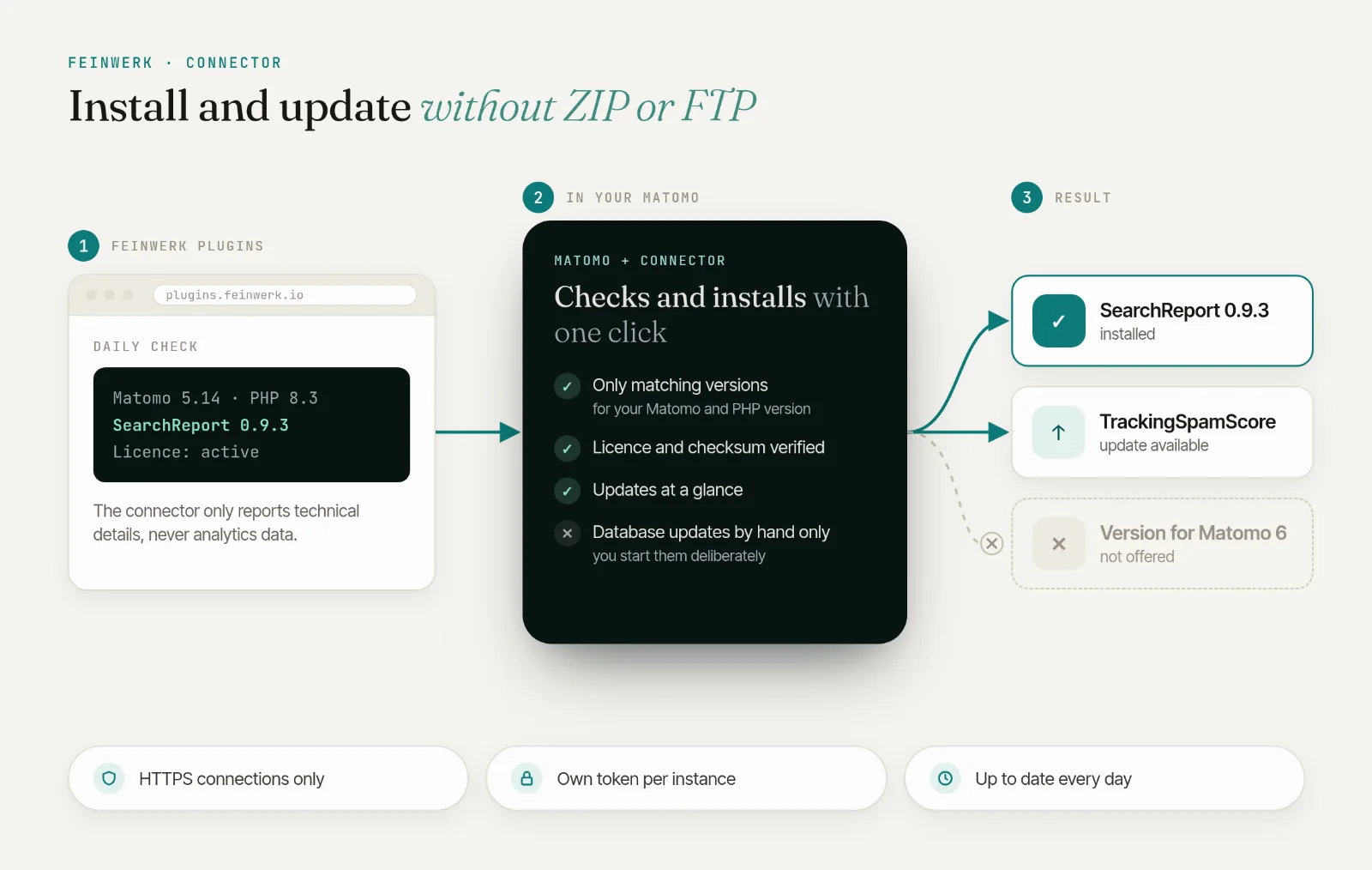
The connector only offers versions that match your Matomo and PHP version and checks the licence and checksum before installing. It never starts database updates by itself, you trigger those deliberately. It reports only technical details such as the Matomo version to our server, never analytics data. The individual steps are in getting started.
Matomo Cloud or self-hosted?
Plugins of your own need a Matomo installation you run yourself: on your server, with your hosting provider or in your cloud. Matomo Cloud does not allow installing your own plugins. Feinwerk's plugins run on Matomo 5 or later with PHP 8.1 or later.
What do Plugins for Matomo cost?
Matomo itself is open source and free when you host it yourself. For plugins, there are both:
- Free: DashboardSegment, DeleteVisitsFilter and PageFilterReport, as a ZIP file or through the connector.
- By subscription: the other plugins, monthly, yearly or for two years. Monthly and yearly plans come with a 14-day free trial. One licence covers one Matomo instance.
Prices are on each plugin page. Four analytics plugins are cheaper together in the Analytics Bundle.
Try all plugins in the live demo
See how the plugins feel in Matomo in our live demo: a Matomo with all plugins and made-up data, no sign-up needed.
Frequently asked questions
Does Matomo stay GDPR compliant with plugins?
The plugins run on your server and the analytics data stays there. The Conversions API only sends conversions with consent, separately per platform. SearchReport fetches data from Google and Bing to you, not the other way round. The connector reports only technical details, never analytics data.
Can I use plugins from the Matomo Marketplace and from Feinwerk together?
Yes. The Feinwerk connector only adds to Matomo. Matomo's Marketplace keeps working as before, and plugins from both sources run side by side.
What happens when I update Matomo?
The connector checks daily which plugin versions match your Matomo and PHP version and offers only those. Every version is tested automatically against several Matomo and PHP versions before release.
Do plugins slow Matomo down?
Your website does not load any slower: the tracking code stays the same and no extra script is added. Inside Matomo, most plugins do their analysis during archiving in the background, just like Matomo's own reports.
What is the difference between Matomo and Piwik?
Piwik was renamed Matomo in 2018, it is the same software. Older plugins for Piwik mostly no longer run on current Matomo versions. Feinwerk's plugins are built for Matomo 5.