


The Feinwerk Connector is now in the Matomo Marketplace. Install it right inside Matomo, no download, no FTP. Read the news · Here is how →
Know your channels, not just your referrers.
Group hundreds of traffic sources into the marketing channels you actually steer: Organic, Paid, Email, Social or your own.
from €59/month · cancel any time
Latest v5.0.2 · Matomo ≥ 5.3.0
Running on 14 Matomo instances
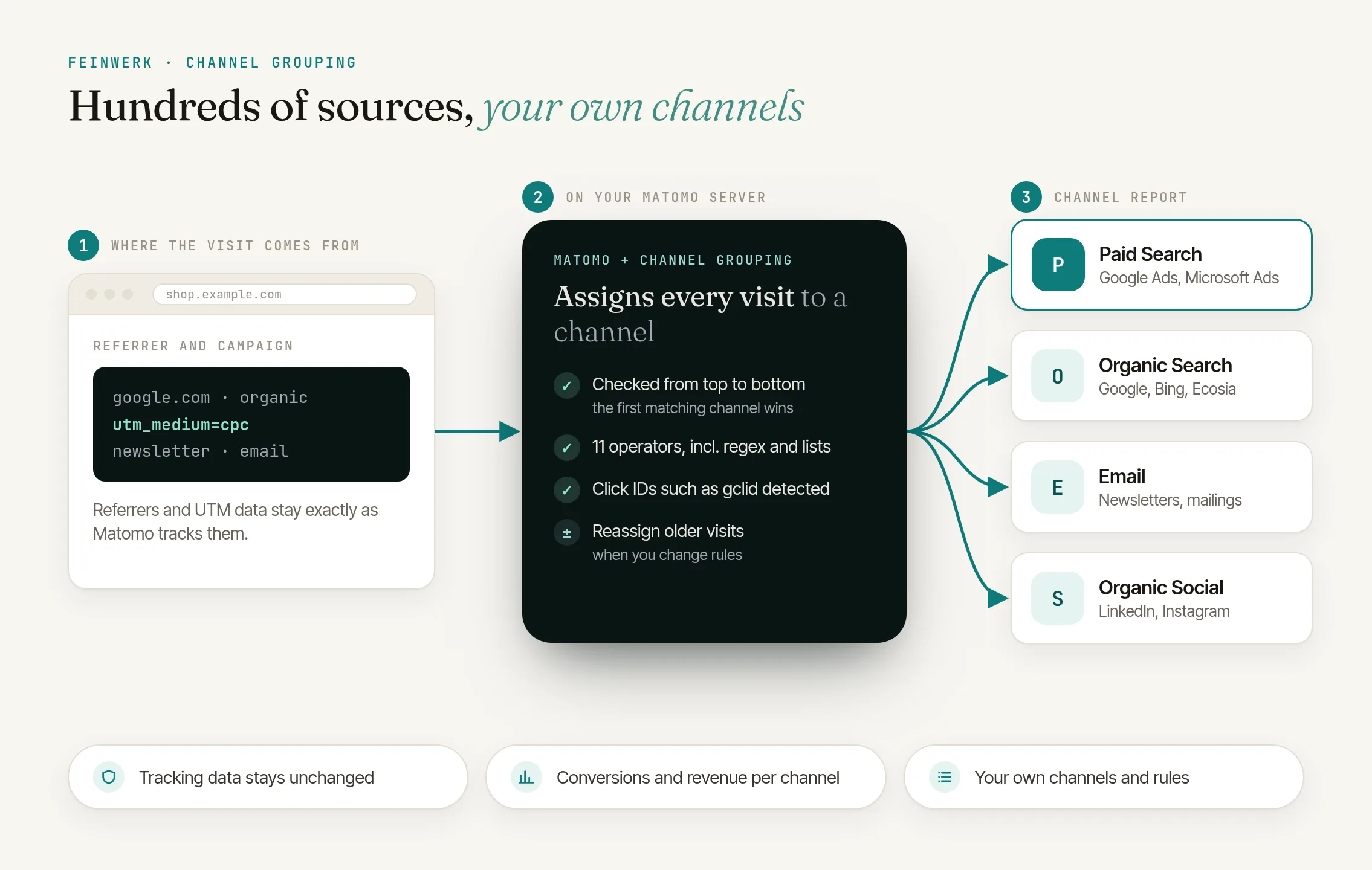
Marketing truth at a glance
How much traffic really comes from email? How does paid compare to organic? One report answers it.
Rules, your way
11 operators for precise, rule-based mapping. Your channel definitions, not someone else's.
Your tracking stays as it is
Referrer and campaign data stay exactly as tracked. The plugin adds the channel to each visit. You can refine rules anytime and re-assign past visits.
Click to enlarge
- License for 1 Matomo instance + 3 test instances, all websites and users
- Prices incl. VAT, billed via Paddle
- 14-day trial, cancel before it ends at no cost
- Updates and support included
- Refunds
Define and compare your own marketing channels in Matomo
Group referrers and UTM campaigns by rule into the marketing channels your team actually works with.
Read the use case →No. A default grouping modelled on Google Analytics 4, with 19 channels such as Paid Search, Paid Social, Organic Search, Email and AI Assistants, is created with one click. You refine it or replace it with your own rules.
We recommend the free Marketing Campaigns Reporting plugin for campaign fields such as utm_source and utm_medium. Without it, the default grouping recognises campaign links only by click IDs. The plugin requires Matomo 5.3 or later.
Visits that match no channel appear as "Not assigned" in the report, so your totals always add up and nothing silently disappears.
Your referrer and campaign data stay exactly as tracked. In addition, the plugin stores each visit's channel, determined at tracking time and used for segments, conversions and revenue. After rule changes, the plugin re-assigns past visits automatically.
Yes. The plugin recognises click IDs from Google Ads, Microsoft Advertising, Meta, TikTok, LinkedIn, X, Snapchat, Pinterest, Yandex and Mailchimp in the landing page URL. A Google Ads click therefore lands in Paid Search. Only the type of click ID is stored, never its value.
In the Channel Grouping report, the channel of the purchase visit counts, so Direct. The attribution reports credit the purchase to the channel of the last non-direct visit or of the first visit within the 90 days before.
Yes. With Visit Journey 0.3.0 or later your channels appear automatically in the visitor paths: in *Paths from the entry page* as the first column before the entry page, and in *Paths to the goal* wherever a path reaches the start of the visit. They are exactly the channels you defined in Channel Grouping with rules.
Heads-up: this version changes database tables
No database schema change when updating from 0.9.0 or later; updating from an older version adds one column to the visits table (log_visit), which on MySQL 5.7 with very large visit tables can take a while. A new installation gets its two log_visit columns from this database update. Updating from a version before 0.11.0 recalculates the channel reports of sites with goals or ecommerce once for the standard period, updating from a version before 0.10.3 rebuilds the week, month and year channel reports once from the daily reports, at most 24 months back (extra archiving load).
Plan the installation for a maintenance window on large instances.
- 01 Install the Feinwerk Connector from Matomo's Marketplace: under Administration › Platform › Marketplace, search for "Feinwerk", install and activate it. Without the Marketplace: download the ZIP.
- 02 Open Feinwerk Plugins and click "Connect with Feinwerk account". If your browser cannot reach the store, enter your instance token in the connector settings instead.
- 03 Open the Feinwerk Plugins screen, find Channel Grouping, and click Install.
Prefer a manual install? After the purchase you will find the ZIP download in your customer account. · Documentation for Channel Grouping
Missing a feature in Channel Grouping? Tell us what you need →
Channel Grouping for Matomo
Group your traffic sources into meaningful marketing channels and understand your marketing performance at a glance.
The problem
Matomo shows you hundreds of referrers, campaigns and traffic sources. But how much traffic really comes from email marketing? And how do your paid campaigns compare to organic search?
The solution
Channel Grouping combines your traffic sources into channels, exactly the way you need them.
Features
Flexible rule-based mapping
Define precise rules that decide which visit belongs to which channel.
- 11 operators: equals, does not equal, contains, does not contain, starts with, ends with, matches regex, is empty, is not empty, is in list, is not in list
- Bundled source lists: search engines, social networks, video platforms, shopping sites, email and AI assistants, including sources from Germany, Austria and Switzerland
- Source and medium: derived from campaign, click ID and referrer, plus rules on the landing page (URL or path)
- Any combination: rules are combined with OR, conditions within a rule with AND
- Channel conditions: apply to all rules of a channel
- Order: channels are checked from top to bottom, and the first match wins. You change the order with a click
- Value suggestions: values from your visits of the last 30 days, including campaigns and custom dimensions
Ad clicks even without UTM parameters
The plugin recognises visits from ads by the click ID in the landing page URL, even when no UTM parameters are set.
- Click IDs from Google Ads, Microsoft Advertising, Meta, TikTok, LinkedIn, X, Snapchat, Pinterest and Yandex, plus Mailchimp
- Assigned correctly: a Google Ads click lands in Paid Search instead of Organic Search
- Data-minimal: only the type of click ID is stored (such as "gclid"), never its value
- Usable everywhere: as a dimension in rules, as the segment Click ID type and in the Visits Log
Editor with draft, test visit and impact
You edit a grouping completely in one editor and save it with one click.
- Draft and active: prepare changes as a draft; only active groupings count for tracking and reports
- Test visit: enter a landing page or referrer URL and see which channel applies and why
- Impact before saving: visits per channel before and after, calculated on the newest visits of the last 30 days, with examples
- Apply your way: a change applies only to new visits, to the standard period or from a day of your choice
- Duplicate: copy a grouping as a draft and rework it calmly
- Version history: every change is kept as a version. Compare versions, load them into the editor or copy them as a new grouping
- Dark mode: the admin page follows Matomo's dark mode
Conversions and revenue per channel
See not just visits, but conversions and revenue per channel.
- Conversions, conversion rate and revenue right in the channel report
- Revenue from goals and ecommerce
- The report also appears on Matomo's goal pages under Goals by Referrers
- Ecommerce per channel under Ecommerce → Sales: orders, revenue, conversion rate, average order value and products purchased, with abandoned carts separately
Goal attribution
Which channel really brought the purchase? Two additional reports under Goals and Ecommerce → Sales answer that.
- Channel (last non-direct touch): conversions from direct visits count for the channel the visitor last came through
- Channel (first touch): every conversion counts for the channel of the first visit
- 90-day lookback, adjustable or switchable off in the Matomo configuration
- Also in email reports and through the API
Your channels in the visitor paths
With Visit Journey your channels also show up in the visitor paths: exactly the channels you defined here with rules, as the first column before the entry page and in the paths to the goal wherever a path reaches the start of the visit. That way paths and channel reports speak the same language.
Multiple websites
One grouping for all your websites, or individual settings per website.
| Applies to | Meaning |
|---|---|
| Only this website | applies to this website only |
| Selected websites | applies to the websites you select |
| All websites | applies to all websites; only super users can create it |
One grouping is active per level. If several levels apply to a website, the more specific one takes priority.
Evolution over time
Follow how your channels develop.
- The graph Channel Grouping Over Time above the report, both in full width
- Several metrics to choose from (visits, actions, conversions, revenue)
- Show or hide channels via the legend
Segmentation
Use your channels as a segment in every Matomo report.
- Dimension Channel Group in the segment editor, with suggestions from your channels
- The report, goals, segment and Visits Log show the same channel for every visit
- Combinable with all other segments
Sources per channel
Click a channel to see the individual referrers and campaigns behind it.
- Sortable by every metric
- Export like any Matomo report, for example as CSV, JSON or XML
Automatic re-assignment
When you change rules or channels, they apply to new visits at once. The plugin re-assigns past visits in the background and has the affected reports recalculated, as far back as Matomo re-archives reports (6 months by default). The admin page shows the progress.
For older periods or targeted runs, there is a command for the command line:
# Test first, without changing anything
./console feinwerkchannelgrouping:backfill --dry-run

# Re-evaluate all visits of one website in a period
./console feinwerkchannelgrouping:backfill --idsite=1 --from=2025-01-01 --to=2025-12-31 --force
The command has the reports of that period recalculated by itself.
Export and import
Back up your configuration or move it to another Matomo instance.
- Export a grouping as a JSON file
- Import with validation of the file, always as a draft, also for exports from older versions
- Handy for moving a grouping from a test instance to production
Custom dimensions
Use your custom dimensions in channel rules.
- Visit dimensions: detected automatically and available in rules
- Flexible rules: combine them with referrer and campaign data
- Your own classification: group by customer type, region or any other value
Note: only visit dimensions are supported. Action dimensions (for example for individual pageviews) are not available, because the channel is assigned per visit.
Examples:
- Channels by customer type, such as "B2B" and "B2C"
- Internal campaign classification
- Channels by region or product
Metrics at a glance
| Metric | Meaning |
|---|---|
| Visits | number of visits per channel |
| Actions | pageviews, downloads, events and other actions |
| Actions per Visit | average number of actions per visit |
| Avg. Time on Website | average duration of a visit |
| Bounce Rate | share of visits with only one action |
| Conversions | number of goals reached |
| Conversion Rate | share of visits with a conversion |
| Revenue | revenue from goals and ecommerce |
Preconfigured channels
Start right away with the default grouping ("Default Channel Grouping v2"), modelled on the default channel groups of Google Analytics 4. Its 19 channels are checked in this order:
| Channel | Captures |
|---|---|
| Direct | visits without source and medium, for example from bookmarks or a typed address |
| Cross-network | campaigns whose name contains "cross-network" |
| Paid Shopping | paid visits from shopping sites or shopping campaigns |
| Paid Search | paid visits from search engines, such as Google Ads clicks |
| Paid Social | paid visits from social networks |
| Paid Video | paid visits from video platforms |
| Display | banner ads with a medium such as display, banner or cpm |
| Paid Other | other paid visits (medium such as cpc, ppc, paid…, retargeting) |
| Organic Shopping | unpaid visits from shopping sites |
| Organic Video | unpaid visits from video platforms |
| Organic Social | unpaid visits from social networks |
| Organic Search | unpaid visits from search engines |
| AI Assistants | visits from AI assistants such as ChatGPT, Perplexity or Gemini |
email campaigns and webmail, also with utm_medium=newsletter |
|
| Affiliates | campaigns with utm_medium=affiliate |
| Referral | referrals from other websites |
| Audio | campaigns with utm_medium=audio |
| SMS | campaigns via SMS |
| Mobile Push Notifications | campaigns via push notifications |
Paid means the medium is, for example, cpc, ppc or paid_social, or a click ID such as gclid supplies it. As in Google Analytics 4, Direct only applies to visits without a medium. Everything else without a matching rule appears as Not assigned in the report. Adjust the channels or create your own. Existing groupings keep working unchanged.
Quick start
- Install the plugin and activate the free Marketing Campaigns Reporting plugin (recommended)
- Open Administration → Websites → Channel Grouping
- Click Create Default Grouping. The grouping is active right away; if the website already has one, it is created as a draft for you to check
- Done: the report appears under Acquisition → Channel Grouping
From now on, new visits get their channel at tracking time. The plugin assigns past visits in the background, and the admin page shows the progress.
Technical details
Requirements
- Matomo 5.3 or later
- PHP 8.1 or later
- Recommended: the free Marketing Campaigns Reporting plugin for campaign fields (utm_source, utm_medium and more). Without it, the default grouping recognises campaign links only by click IDs
Archiving and data
- The channel is determined at tracking time and stored with each visit. The report, goals, segment and Visits Log use this channel. Your referrer and campaign data stay unchanged.
- Of click IDs, only the type is stored (one additional column in the visits table), never the value.
- Every saved change of a grouping is kept as a version (the newest 50 per grouping), shown in the editor's History tab.
- For attribution the plugin recognises visitors, like Matomo, by their visitor ID. Without cookies or a user ID an earlier visit may be missing.
- The report is as current as Matomo's last archiving run.
- Everyone with at least write access to the website can edit groupings; groupings for all websites need a super user.
Available dimensions
Referrer:
referrer_type(direct, search, social, website, campaign, ai)referrer_name(for example "Google", "Facebook")referrer_urlreferrer_keyword
Campaign (UTM, with Marketing Campaigns Reporting):
campaign_name(utm_campaign)campaign_source(utm_source)campaign_medium(utm_medium)campaign_content(utm_content)campaign_keyword(utm_term)campaign_id(utm_id)
Source, medium, landing page, click ID:
sourceandmedium(derived from campaign, click ID and referrer)landing_page_urlandlanding_page_pathclick_id(click ID type, such as gclid)
Custom dimensions:
dimension1,dimension2and more (visit dimensions)
Operators
| Operator | Meaning |
|---|---|
| equals | exact match |
| does not equal | no match |
| contains | contains the value |
| does not contain | does not contain the value |
| starts with | starts with the value |
| ends with | ends with the value |
| matches regex | regular expression without delimiters, at most 500 characters |
| is empty | field is empty |
| is not empty | field has a value |
| is in list | value is in one of the bundled source lists |
| is not in list | value is not in the chosen source list |
Upper and lower case are ignored unless the field Aa (Case Sensitive) is ticked.
API
The channel report is available through Matomo's Reporting API as FeinwerkChannelGrouping.getChannels, for example for exports or dashboards. Through the API, FeinwerkChannelGrouping.saveGrouping saves a grouping as a whole, getChannelsLastNonDirect and getChannelsFirstTouch return the attribution reports, getGroupingVersions the version history, getSourceLists returns the source lists and getAvailableOperators the value type per operator.
Upgrading from Channel Grouping
Up to version 0.5 this plugin was called ChannelGrouping. Install and activate FeinwerkChannelGrouping: it takes over groupings, channels, rules, the channel assignment of visits, archived reports, settings, email reports and saved views, and removes the old plugin automatically. Do not uninstall the old plugin yourself, as that would delete the channel data.
-
v5.0.2 Nov 11, 2026
- The feedback question below the reports and the admin page now takes a single compact line.
-
v5.0.1 Nov 6, 2026
- The two columns in which the plugin stores the channel and the click ID type of each visit are now added by Matomo's database update, no longer by the plugin when it is activated. On large databases you can run the update on the command line as usual with
./console core:update. - When you activate Channel Grouping for the first time, run the database update that Matomo shows afterwards. Until then no visits are assigned to channels; the reassignment catches up on them later. If automatic updates are switched off in Matomo, the Channel Grouping admin page reminds you of the update.
- The reassignment of past visits now reads through Matomo's index only when the database may use it. Otherwise it reads as before 0.11.2 instead of failing.
- When you update from 5.0.0, nothing changes in the visits table and nothing is recalculated.
v5.0.0
- New: below the reports "Channel Grouping", "Channel (last non-direct touch)" and "Channel (first touch)" and below the admin page, you can tell us with thumbs up or down whether everything is right. Next to it, "Support" opens Feinwerk's contact form.
- Your Matomo server sends your answer to Feinwerk with the plugin and Matomo version, browser and language, nothing about you, your website or your visitors. Set
feedback = 0in the[FeinwerkChannelGrouping]section of the Matomo configuration to switch the question off. - The version number now follows the Matomo version: 0.11.2 is followed by 5.0.0, and Matomo shows the update as usual.
- The update changes no data and needs no new archiving.
- The two columns in which the plugin stores the channel and the click ID type of each visit are now added by Matomo's database update, no longer by the plugin when it is activated. On large databases you can run the update on the command line as usual with
-
v0.11.2 Oct 22, 2026
- Reassigning past visits after a rule change and the command
feinwerkchannelgrouping:backfillnow read visits much faster on MariaDB. In a test, reading one month with 1.7 million visits took 18 instead of 176 seconds. On MySQL, reading was already this fast. - The update changes no data and needs no new archiving.
- Reassigning past visits after a rule change and the command
-
v0.11.1 Oct 17, 2026
- In the reports "Channel (last non-direct touch)" and "Channel (first touch)", channels without attributed conversions can now be expanded as well. They show the visits per source, for example Facebook or Instagram under social networks.
- Channels whose only source is direct visits no longer expand, as in the "Channel Grouping" report. Previously they showed only the entry "Direct entry".
- The change applies right away, no new archiving is needed.
v0.11.0
- The reports "Channel (last non-direct touch)" and "Channel (first touch)" can now be expanded. Click a channel to see the sources through which the credited visitors came, for example Google, Bing or your newsletter.
- For each source you see conversions, revenue and, under Ecommerce, orders, average order value and purchased products, together with the visits of that source in the selected period.
- The flat view shows channel and source in one row.
- After the update, Matomo recalculates the channel reports once for the standard period. This happens with the next archiving run and causes extra load once.
-
v0.10.3 Oct 15, 2026
- Week, month and year channel reports (including goal attribution) show the channels of the days after a reassignment or a new installation. Before, they could stay empty or show the old assignment. The update rebuilds the weeks, months and years already archived once, at most 24 months back. This happens in the next archiving run and adds archiving load once.
- After a new installation, Matomo no longer asks for a database update.
- Evolution: the "archiving pending" notice only appears when the period shown has no channel data. Before, only the previous day was checked.
- API: spaces at the start or end of
period,date,scope,status,applyMode,applyFrom,dimensionandsearchare ignored. - Revised texts in notices and the description. The test visit now names the matching rule in parentheses, for example "Channel: Direct (rule 2 applies)".
-
v0.10.2 Oct 13, 2026
-
v0.10.1 Oct 8, 2026
-
v0.6.3 Oct 6, 2026
-
v0.6.2 Sep 30, 2026
-
v0.6.1 Sep 26, 2026
We measured how much extra load Feinwerk Channel Grouping adds to Matomo's archiving on a large test instance, with and without the plugin.
| Measurement | added by the plugin |
|---|---|
| Archiving time per night | about 8 seconds (+4 %) |
| Database work | about 0.6 % more rows read |
| Peak memory | no measurable increase |
Test setup: 5 million hits per month, Matomo 6, server with 4 cores, 3 of them for Matomo, 7.7 GB RAM and SSD, MariaDB 10.11 with a 2 GB database cache, PHP 8.3. We measured the nightly archiving of one day with its week, month and year; without the plugin it took 3 minutes 14 seconds.
Year part: The test year holds one month of data. In a control test with twelve filled months on a smaller test instance, the year archive needed no extra memory with the plugin and no more database queries than with one month.
Rule changes: When you change rules, the plugin re-assigns past visits in the background. On the test instance this took about 1.5 minutes per month with 1.7 million visits, and the following recalculation of the channel reports about 1 minute.
As a table
| Recalculation of the reports | Re-assignment | |
|---|---|---|
| Earlier versions | 60 s | 292 s |
| Current versions | 60 s | 86 s |
Up to version 0.11.1 (Matomo 5) and 1.0.0-beta.2 (Matomo 6) re-assigning a month took about 5 minutes, since 0.11.2 and 1.0.0-beta.3 about 1.5 minutes. The recalculation of the channel reports afterwards still takes about 1 minute.
Measured in October 2026 with version 1.0.0-beta.3 and Matomo 6. The versions for Matomo 5 from 0.11.2 calculate the channel reports the same way. On other servers, with other data and settings, the values differ.