


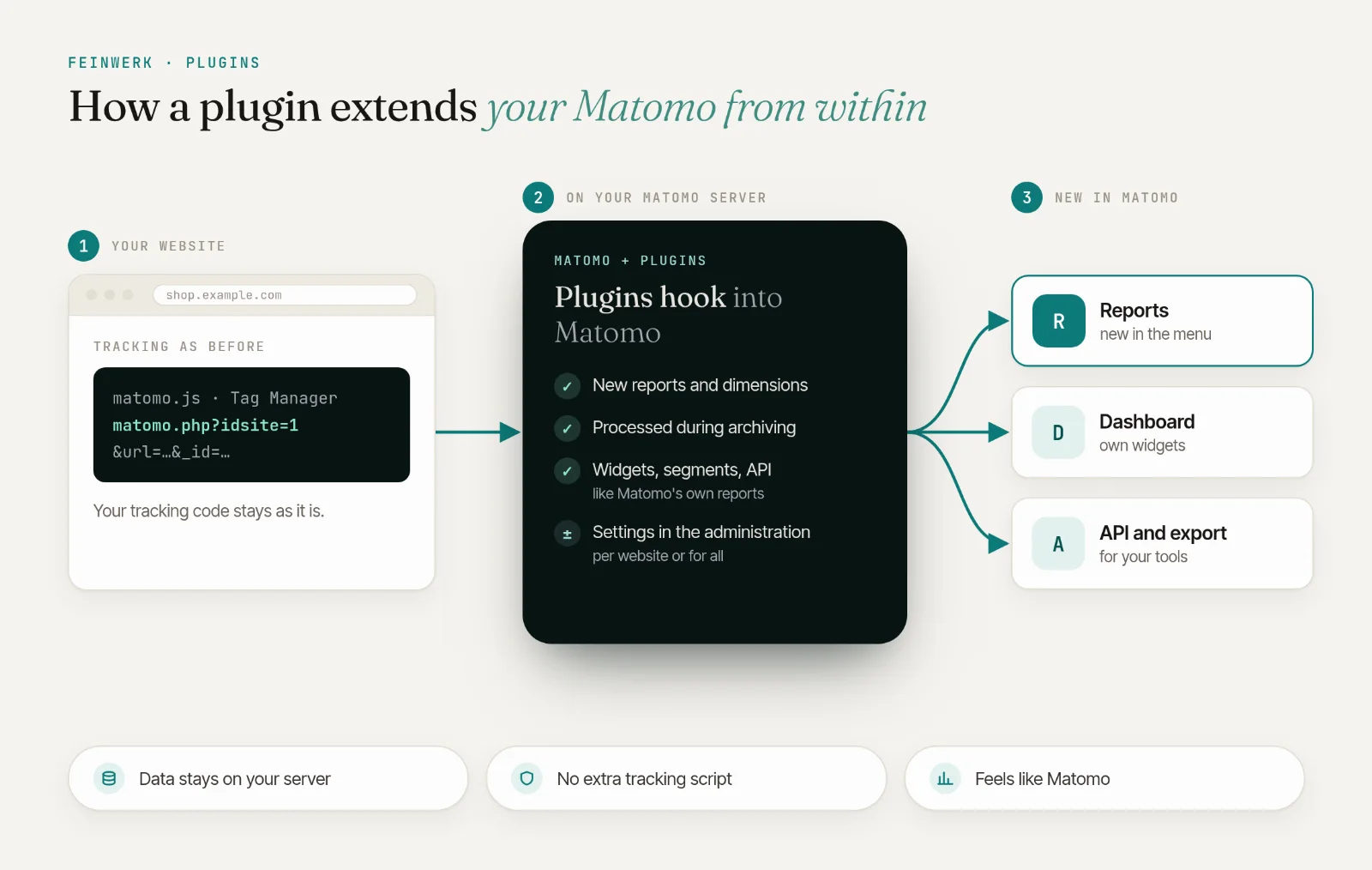
The Feinwerk Connector is now in the Matomo Marketplace. Install it right inside Matomo, no download, no FTP. Read the news · Here is how →
One tracking hit. Every Matomo site that needs it.
Keep every website in its own profile and add a shared profile with continuous sessions: one tracking request, copied on the server to the sites you allow.
from €29/month · cancel any time
Latest v5.0.1 · Matomo ≥ 5.0.0
Own profiles plus a shared one
Every website or section keeps its own Matomo profile and reports. A shared profile additionally sees everything, for example all brands or all regions.
Continuous sessions, unlike roll-ups
Roll-up reports only add up separate visits: a visitor moving from blog to shop counts twice and the path breaks. In the shared profile it stays one visit, with the real entry page, referrer and order.
One request, one tracker
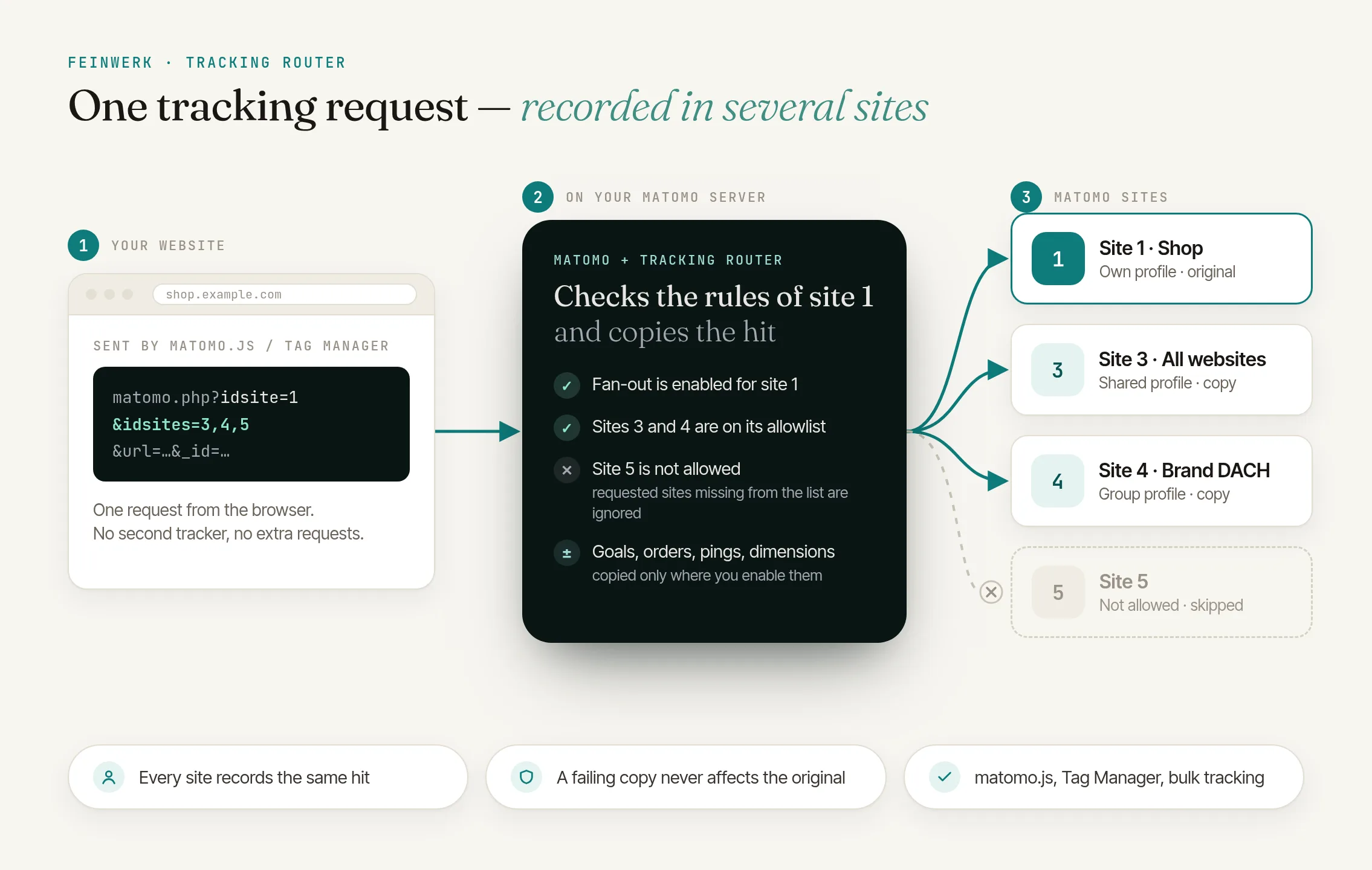
No second tracker in the browser: the server copies the hit, only to the sites you allow. A failing copy never affects the original, and requests without idsites stay unchanged.
Click to enlarge
- License for 1 Matomo instance + 3 test instances, all websites and users
- Prices incl. VAT, billed via Paddle
- 14-day trial, cancel before it ends at no cost
- Updates and support included
- Refunds
Track multiple websites at once, with one hit for every Matomo site that needs it
One tracking hit lands in your website and in up to ten more Matomo sites, ideal for a roll-up across several websites.
Read the use case →Roll-Up Reporting adds up the reports of several sites. Each site still has its own visits, so a visitor who moves from one site to another counts as two visits and the path between them is lost. Tracking Router records the hit in a shared profile as well, where pages of all sites form one continuous visit. Reports per site stay available in their own profiles.
The visitor has to be recognized as the same person on every domain of the shared profile: without cookies by the same fingerprint, with cookies by cross-domain linking (different domain names) or a wildcard cookie domain such as *.example.com (subdomains), or by a User ID. Otherwise each domain starts a new visit in the shared profile; the profiles of the individual websites are not affected.
Only where hits should also go to other websites: add idsites, e.g. with appendToTrackingUrl in matomo.js or the "Append To Tracking Url" field in Tag Manager. Everything else keeps working unchanged.
Only if you enable it per type, and only if the extra sites have the same goals and dimensions under the same IDs, because these IDs are numbered per site. Events, content tracking and site search need no preparation.
If the request carries one (cookie, User ID), the copies keep it. With cookieless tracking, Matomo identifies the visitor in each site separately, as it always does; visits within each site, including the shared profile, are formed as usual.
A switch on the primary site declares that its visitors' consent also covers the allowed extra sites. As long as it is off (the default), nothing is copied.
Requests without idsites are not touched. Each extra site means one more tracking request for your server to process. QueuedTracking has not been tested together with this plugin yet.
- 01 Install the Feinwerk Connector from Matomo's Marketplace: under Administration › Platform › Marketplace, search for "Feinwerk", install and activate it. Without the Marketplace: download the ZIP.
- 02 Open Feinwerk Plugins and click "Connect with Feinwerk account". If your browser cannot reach the store, enter your instance token in the connector settings instead.
- 03 Open the Feinwerk Plugins screen, find Tracking Router, and click Install.
Prefer a manual install? After the purchase you will find the ZIP download in your customer account. · Documentation for Tracking Router
Missing a feature in Tracking Router? Tell us what you need →
Tracking Router
Tracking Router records one tracking hit in several websites of your Matomo, on the server side.
Own profiles and one continuous session
Keep every website, brand or section in its own Matomo profile, and add a shared profile that sees everything. A visitor who reads your blog, then buys in your shop, appears in the blog profile, in the shop profile, and in the shared profile as one continuous visit: the whole path, the real entry page and referrer, and the order belong together.
Roll-up reports cannot do this: they add up the visits of separate sites, so the same visitor counts twice and the path between the sites is lost.
Prerequisite: in the shared profile, the visitor has to be recognized as the same person on every domain, for example
- by the same fingerprint (cookieless tracking, nothing to configure),
- by cross-domain linking for different domain names (
enableCrossDomainLinkingandsetDomains; in Tag Manager "Enable Cross Domain Linking" and "Domains"), - by a wildcard cookie domain for a domain and its subdomains (
setCookieDomain('*.example.com'); in Tag Manager "Cookie Domain"), - or by a User ID for logged-in users.
How it works
The page sends one tracking request with the additional parameter idsites:
matomo.php?idsite=1&idsites=3,4&url=…
Matomo records it as usual for site 1 (the primary site) and, on the server, copies it to each requested site that the primary site allows. Requests without idsites are processed exactly as before.
- Copies carry the visitor ID of the original request if it has one (cookie, User ID). With cookieless tracking, Matomo identifies the visitor in each site on its own, as it always does.
- Goal conversions, ecommerce orders, heartbeat pings and custom dimensions are only copied where you enable them.
- A copy that cannot be recorded is skipped; the original request and the other copies are recorded anyway.
Setup
- Primary site: under Administration → Websites → Manage, edit the website, section Tracking Router: turn on Enable fan-out (consent covers the extra sites) and select the allowed extra sites.
- Extra sites: goals and custom dimensions are numbered per site. If you copy them, create them on every extra site with the same IDs and meaning.
- Website: send
idsiteswith the tracking requests:- Tag Manager: in the Matomo Configuration variable, field Append To Tracking Url:
idsites=3,4. This is the simplest way for fixed extra sites. For extra sites that change per page (e.g. per section), use a Custom Request Processing function instead. Custom Data with the nameidsitesworks too, as the first custom data entry. - matomo.js:
_paq.push(['appendToTrackingUrl', 'idsites=3,4']);beforetrackPageView.
- Tag Manager: in the Matomo Configuration variable, field Append To Tracking Url:
Settings
| Setting | Default | Purpose |
|---|---|---|
| Enable fan-out (consent covers the extra sites) | off | Turns routing on for the primary site and confirms that your visitors' consent also covers the extra sites. The other settings appear once it is on. |
| Allowed extra sites | empty | Up to ten sites, listed by name. Requested sites missing here are ignored. |
| Copy ecommerce orders and cart updates | off | Otherwise orders are only recorded on the primary site. |
| Copy manual goal conversions | off | Requires the same goals with the same IDs on the extra sites. |
| Copy heartbeat pings | off | Turn on together with heartbeat tracking for correct visit durations. |
| Copy custom dimensions | off | Requires the same dimensions with the same IDs on the extra sites. |
| Force the visitor ID on the copies | off | Advanced; only for setups where every request carries a stable visitor ID. |
For the whole installation under Administration → System → General settings → Tracking Router: Require Admin access to every extra site. Turn it on as soon as different people or customers manage different websites.
Operation
- Server load: every extra site means one more tracking request to process. Requests without
idsitesare not touched. - Privacy: every extra site stores its own raw data of the visit. The websites should share the same data controller and consent, which is what the fan-out switch confirms.
- Multiple servers: changed settings take effect once the tracker cache expires (300 seconds by default), immediately with
./console core:clear-caches. - CDN:
matomo.phpmust not be cached by a CDN, because the copying happens on the server.
Working with other plugins
- BulkTracking: each hit of a bulk request is copied according to its own
idsites; BulkTracking's handling of invalid hits is unchanged. - QueuedTracking: not tested together with this plugin yet.
Limits
- At most ten extra sites per request and per primary site.
- Copies are not forwarded again.
-
v5.0.1 Nov 11, 2026
- The feedback question and tips now take a single compact line.
v5.0.0
- New version numbers: the plugin for Matomo 5 now carries version 5.x.
- Below the plugin's settings (Administration, System, General settings), super users can tell us with one click whether the copies arrive in the extra sites as expected, and reach Feinwerk support there. A short tip from Feinwerk is shown there as well. Both can be switched off in the configuration.
- The plugin's settings are headed "Feinwerk Tracking Router" in every language.
-
v2.1.2 Oct 15, 2026
- Fixed: removing the last site from Allowed extra sites in the site settings is now saved. Until now the list kept its old value, and requests were still copied to that site.
- If you emptied the list before this update, open the site's settings once: sites still shown there are active. Remove them and save.
- Fixed: site IDs with spaces around them (for example set through the API) are accepted on PHP 7.4 as well.
- Documentation: for server-side tracking with
token_auth, the token needs Write access on every extra site. New notes explain how visitors are recognised across domains for continuous sessions. - No new settings, no database schema change.
-
v2.1.1 Oct 9, 2026
-
v2.0.2 Sep 30, 2026
-
v2.0.1 Sep 26, 2026
-
v1.1.0 Jul 1, 2026