


One dashboard for your whole team, always in your current version.
Share a Matomo dashboard with specific users or everyone. They get a read-only copy that updates itself every time they open it, instead of a one-off snapshot.
Latest v1.0.2 · Matomo ≥ 5.0.0
Up to date, not a snapshot
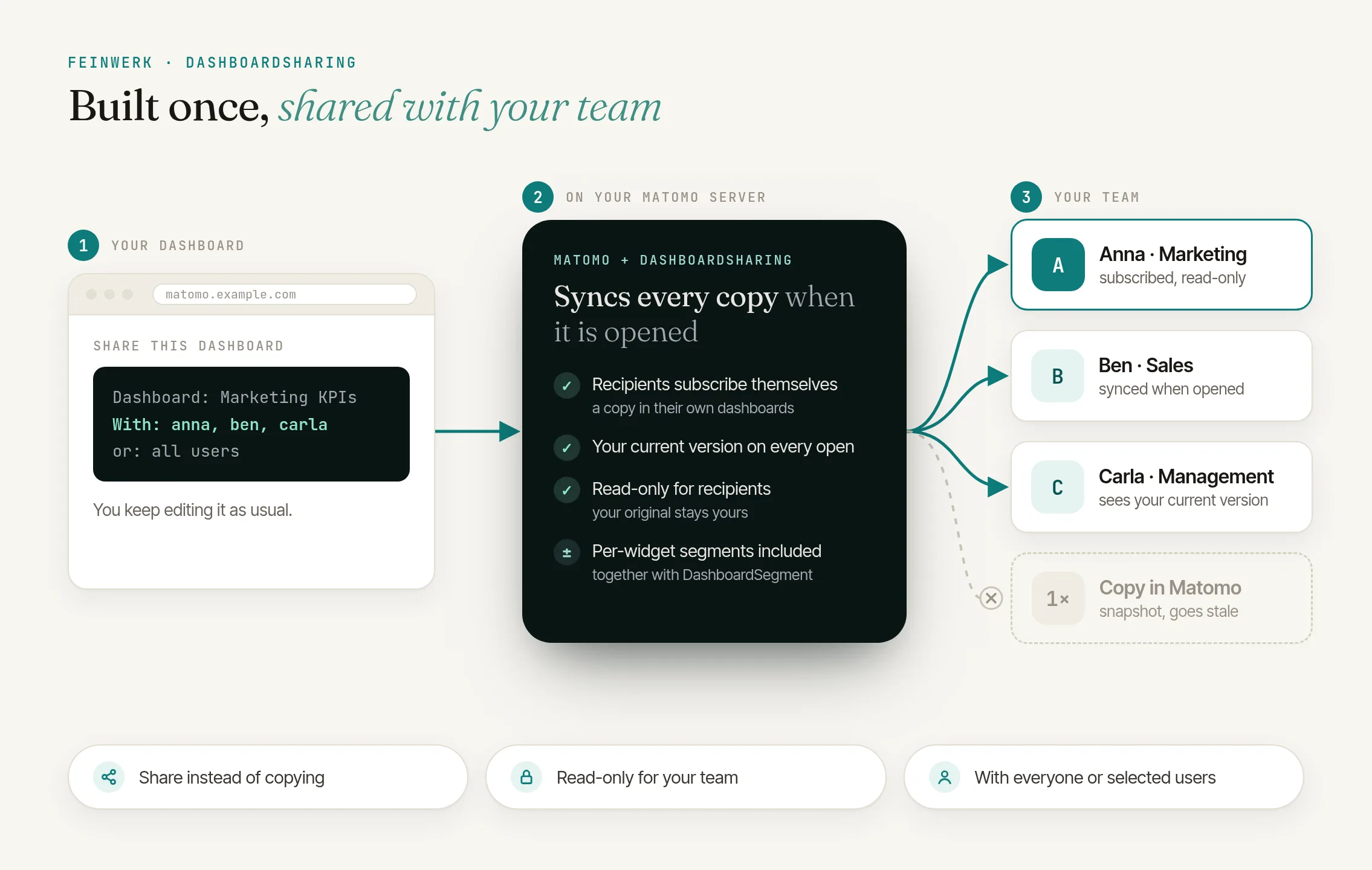
Matomo's "Copy dashboard to user" is a one-off snapshot and needs admin rights. A shared dashboard stays connected to your original and shows your current version every time it is opened.
One dashboard for the team
Build a dashboard once and let your colleagues subscribe. They always see your latest layout and widgets, without you re-sending anything.
Read-only by design
Subscribers see where the dashboard comes from and can't change it. Stop sharing and they simply keep the last version they received.
Better together with segments
With DashboardSegment installed, a shared dashboard also carries each widget's own segment and time range.
Click to enlarge
Maintain one dashboard, and the whole team always sees the current version
Share a Matomo dashboard with all users or selected colleagues instead of rebuilding it for each person or handing out copies that go stale at once.
Read the use case →Matomo's copy is a one-off snapshot and needs admin access; later changes to the original never reach the recipient. A shared dashboard stays connected to your original and always shows your current version.
No. Any signed-in user with at least view access to the website can share and subscribe.
No. Subscriptions are read-only. If you stop sharing, subscribers keep the last version they received.
On its own it shares widgets and layout. With DashboardSegment installed, it also carries each widget's segment and time range across the share.
No. It only adds the share and subscribe controls; nothing changes until you share a dashboard.
-
01
Download the Feinwerk connector and unzip it into your Matomo's
plugins/directory, then activate it. - 02 Open its settings and set the marketplace URL and your instance token.
- 03 Open the Feinwerk Plugins screen, find DashboardSharing, and click Install.
Prefer a manual install? Download the ZIP of version 1.0.2 and install it yourself. Download ZIP · Documentation for DashboardSharing
Missing a feature in DashboardSharing? Tell us what you need →
DashboardSharing
DashboardSharing lets you share a Matomo dashboard with other users. Your colleagues see it read-only and always in your current version, instead of a one-off copy that goes stale the moment you change the original.
Matomo can only pass a dashboard on with Copy dashboard to user. That needs admin access and creates a snapshot: change the original afterwards and the recipient never sees it. DashboardSharing keeps the shared dashboard connected to your original instead.
Features
- Share with anyone: share a dashboard with all users or with specific users, under a name of your choice for the recipients.
- One-click subscribe: your colleagues add the shared dashboard to their own dashboard list with one click.
- Always current: every time a subscriber opens it, the subscription takes over your current state: widgets and layout and, with DashboardSegment installed, each widget's segment and time range.
- Read-only: subscribers see who the dashboard comes from and cannot change it. If you stop sharing, they keep the last version they received.
- Works on its own: no other plugin required. Install DashboardSegment alongside it and shared dashboards also carry each widget's segment and time range.
How it works
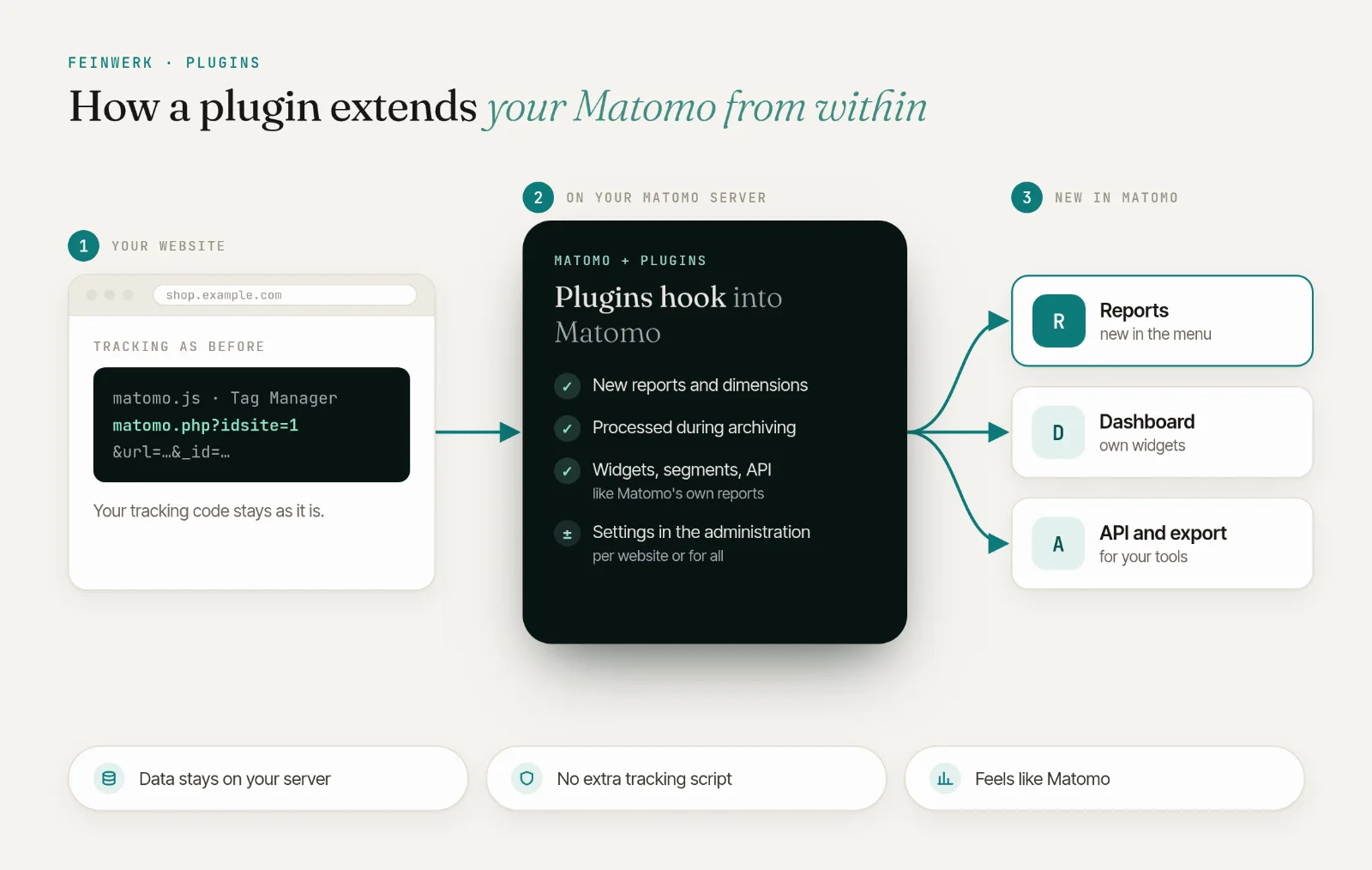
DashboardSharing only adds to Matomo: it changes no files of Matomo or of the bundled Dashboard plugin, so it survives Matomo updates.
- Sharing is available to signed-in users with at least view access to the website. For viewers who are not signed in it stays idle.
- A subscription is the recipient's own dashboard that mirrors yours; it is refreshed from your current version each time it is opened.
Requirements
- Matomo 5
- PHP 8.1 or newer
- The bundled Dashboard plugin (active by default).
- Optional: DashboardSegment, to carry per-widget segments and time ranges across a share.
Installation
With one click through the Feinwerk connector or as a ZIP file, see Installing plugins.
Usage
- Open a dashboard.
- Use Share this dashboard to share it with everyone or specific users, under a name of your choice.
- Other users open Import a shared dashboard, pick yours and subscribe.
- From then on they always see your current version, read-only.
License
Free plugin under GPL v3 or later.
-
v1.0.2 Oct 14, 2026