


See the paths, not just the pages.
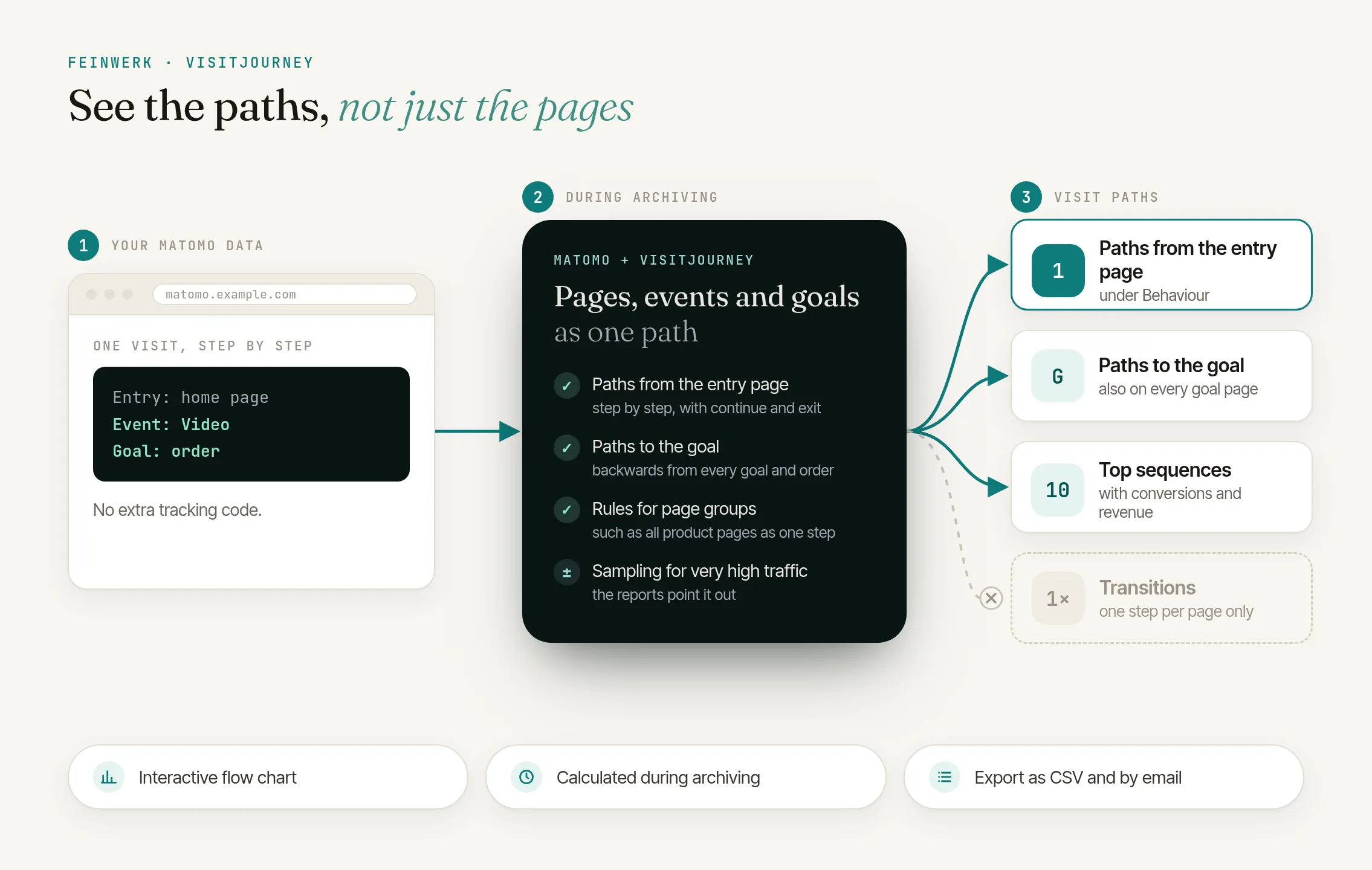
Follow in Matomo how visits move on from the entry page through pages, events and goals, and which steps come before an enquiry or an order, as an interactive flow chart.
from €49/month · cancel any time
Latest v0.2.2 · Matomo ≥ 5.12.0
Paths, not single pages
Matomo counts how often each page is viewed. VisitJourney shows what happens next: step by step from the entry page, with the share that continues or exits.
See what happens before the goal
For every goal and every ecommerce order, VisitJourney shows the steps before the conversion and the most frequent sequences, right on the goal's own page and on the ecommerce overview as well. A funnel for every goal, without defining the steps up front.
Pages, events and goals in one path
A video start or a form event appears as a step of its own between the page views. Group product pages into one entry by rule so the paths stay readable.
Calculated during archiving
Paths are built by Matomo's archiving, not when a report is opened. Size limits and optional sampling keep the effort in check even with very high traffic.
Click to enlarge
- License for 1 Matomo instance, all websites and users
- Prices incl. VAT, billed via Paddle
- 14-day trial, cancel before it ends at no cost
- Updates and support included
- Refunds
See which paths visits take through your website
See in Matomo, as a flow chart, where visits go after the entry page, where they leave and which steps come before a goal.
Read the use case → Use casesConversion paths and funnels: the steps before every order and enquiry
For every goal and every ecommerce order, VisitJourney shows the steps before it and the most frequent sequences, right on the goal's own page as well.
Read the use case →Transitions shows, for a single page, what visitors did directly before and after it. VisitJourney shows whole paths across several steps, from the entry page or backwards from a goal, and includes enabled events and goals as steps of their own.
Yes, just without steps defined up front. Paths to the goal shows for every goal and every ecommerce order which steps the conversions came through, also right on the goal's own page and on the ecommerce overview. Paths from the entry page shows per step how many visits continue and how many exit. So you don't have to guess beforehand which pages belong in the funnel: VisitJourney shows the paths visitors actually take.
No. VisitJourney analyses the page views, events, goals and ecommerce orders that Matomo already records. Nothing changes in the tracking on your website.
Only events whose category you enable in the website settings, either with the category alone or with category and action. Without entries, no events are shown. That keeps frequent scroll or technical events out of your paths.
Yes, as long as Matomo still has the raw data of those days. After you first save the settings of a website, and after every change, the next archiving run recalculates the last 30 days, weeks, months and years included. For older periods the plugin shows the matching console command, with your website and the date range.
Yes, with segments that Matomo processes in advance. In the segment editor that is the option "segmented reports are pre-processed". For other segments the report shows a notice instead of a chart.
Yes. Every widget keeps its own goal, steps and entries, so the paths to the order can sit next to the paths to the contact enquiry. Two to three steps fit a half-width dashboard column; longer paths scroll sideways inside the widget.
Yes. Paths are built during archiving, never when a report is opened. Size limits keep the memory needed in check, and rare paths are summarised as "(Others)". For very large instances there is sampling, and the reports then point it out.
No. Every path describes one visit, from its first page to its last step. If a visit had no earlier step before the goal, the path shows "(Start of visit)".
Yes. Export the top sequences before a goal as a CSV file and add them to Matomo's email reports. The step details list up to 500 entries of a step, and their export contains all of them, with column names in your language. For your own analyses there are the API methods getForwardFlow, getBackwardFlow, getTopSequences and getStepEntries.
Everyone who can view the website in Matomo sees the reports. The settings of a website can be changed by users with admin access to that website, the limits for the whole instance only by super users.
Matomo 5.12 or later and PHP 8.1 or later. The interface is available in English and German and follows Matomo's dark mode.
-
01
Download the Feinwerk connector and unzip it into your Matomo's
plugins/directory, then activate it. - 02 Open its settings and set the marketplace URL and your instance token.
- 03 Open the Feinwerk Plugins screen, find VisitJourney, and click Install.
Prefer a manual install? After the purchase you will find the ZIP download in your customer account. · Documentation for VisitJourney
Missing a feature in VisitJourney? Tell us what you need →
VisitJourney
VisitJourney shows in Matomo which paths visits take through your website: step by step forwards from the entry page and backwards from every goal. Page views, selected events and goals are equal steps of a path. You find the reports under Behaviour → Visit Journey.
Features
- Paths from the entry page: a flow chart shows where visits go after their first page, with the share that continues or exits. Choose 5 to 50 entries per step and show or hide steps with + Step and ×. Rare entries are summarised as "(Others)", with their number.
- Paths to the goal: for every goal and for ecommerce orders, the steps before the conversion, plus the top sequences with conversions, share and revenue. A click on a sequence highlights exactly that path in the chart. The widget also appears on every goal's page and on the ecommerce overview.
- Explore: point at an entry and the connected paths are highlighted. A click pins the highlight; Esc or a click elsewhere releases it. A click on a column header lists up to 500 entries of the step, and the CSV export contains all of them.
- Many goals, your own dashboards: the goal picker looks like Matomo's own fields and adds a search field once a website has eight goals or more. On a dashboard every widget keeps its own goal, steps and entries, and two to three steps fit a half-width dashboard column. On the report pages Matomo remembers your choices and the last goal you picked for each website.
- Your page structure: pages appear by URL or page title and can be grouped by rule, such as all pages under
/products/as "Product page". Events appear only for the categories you enable. - Export and API: top sequences and the entries of a step as a CSV file with column names in your language, the top sequences also in email reports, plus four API methods.
- Dark mode and two languages: the interface is available in English and German and follows Matomo's dark mode.
How counting works
- Paths from the entry page count visits, on the day of their last action, like Visitors → Overview.
- Paths to the goal count every conversion individually, on its own day, like the Goals report.
- Identical steps in a row, such as a reload, count as one step.
- Downloads, outlinks, site search and events that are not enabled create no step and do not interrupt the path.
- Every path describes one visit. The plugin does not join paths across several visits.
- Weeks, months and years are the sum of their days. After a settings change they show the new paths too, once the next archiving run has finished.
Large instances
Paths are built during Matomo's archiving, never when a report is opened. Size limits per website and day keep the memory needed in check. If you like, the plugin processes a sample above a number of visits per day that you set, and extrapolates; the reports then say so. Paths are available for all visits and for segments that Matomo processes in advance.
Requirements
- Matomo 5.12 or later
- PHP 8.1 or later
- Matomo's archiving, as a cron job for high traffic
Installation
With one click through the Feinwerk connector or as a ZIP file, see Installing plugins.
License
Paid plugin under the Feinwerk EULA.
-
v1.0.0-beta.3 Oct 15, 2026