


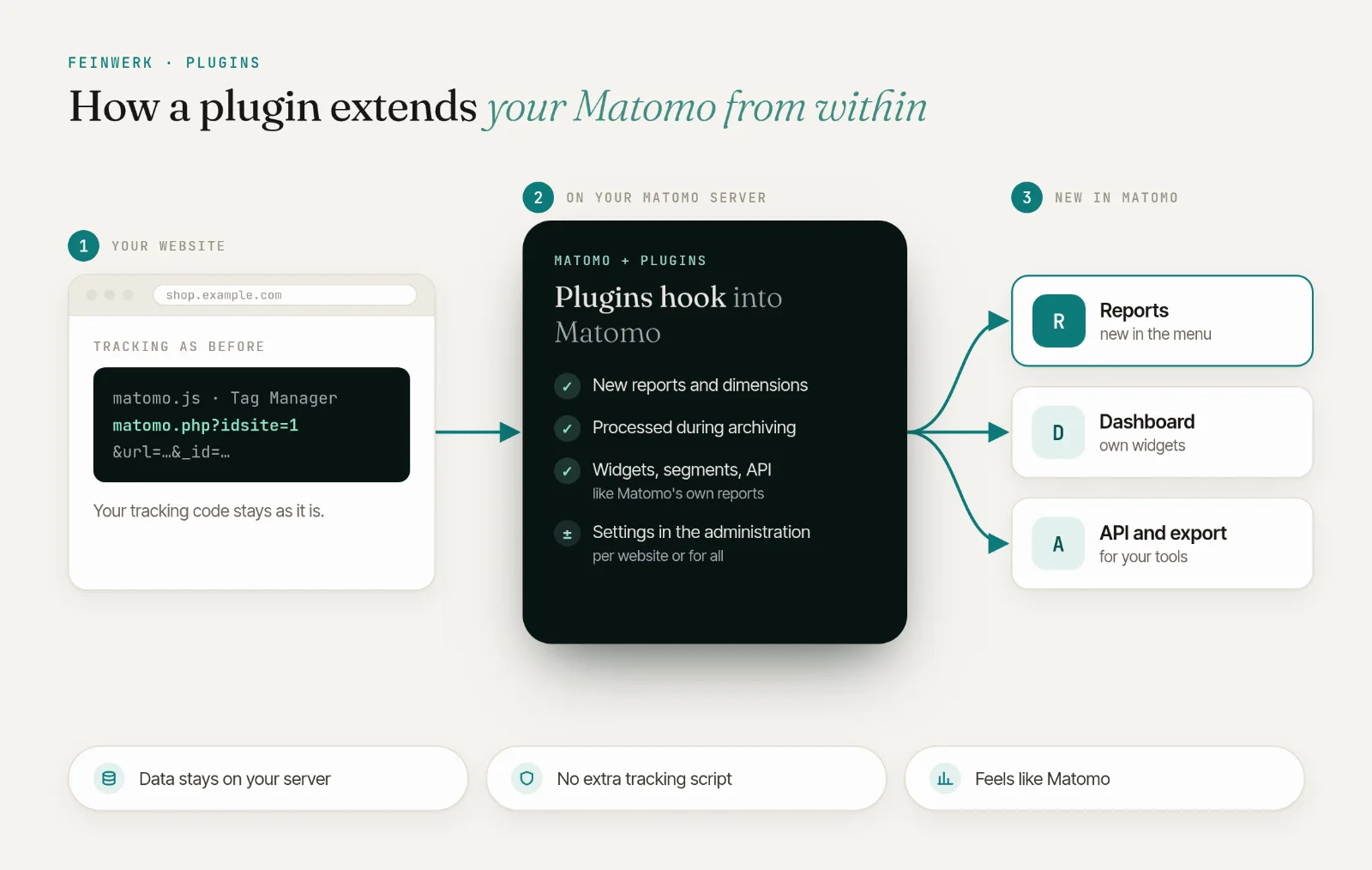
The problem: you know how often, but not which way
Matomo counts every conversion. The goal reports show which channel, campaign and entry page it came from and which pages were viewed before it, each page on its own. In which order buyers and prospects moved is not in any report: whether they read the guide first and then the prices, or landed on a product page and went straight to the basket. That order sits in single visits in the Visits Log, and single visits do not reveal patterns.
Matomo alone
- Conversions per channel, campaign and entry page
- Which pages were viewed before a conversion, each on its own
- The order only visit by visit in the Visits Log
With VisitJourney
- The steps before the conversion in their order, as a flow chart
- The most frequent sequences with conversions, share and revenue
- Events and other goals as steps along the way
The solution: paths to the goal for every goal and your shop
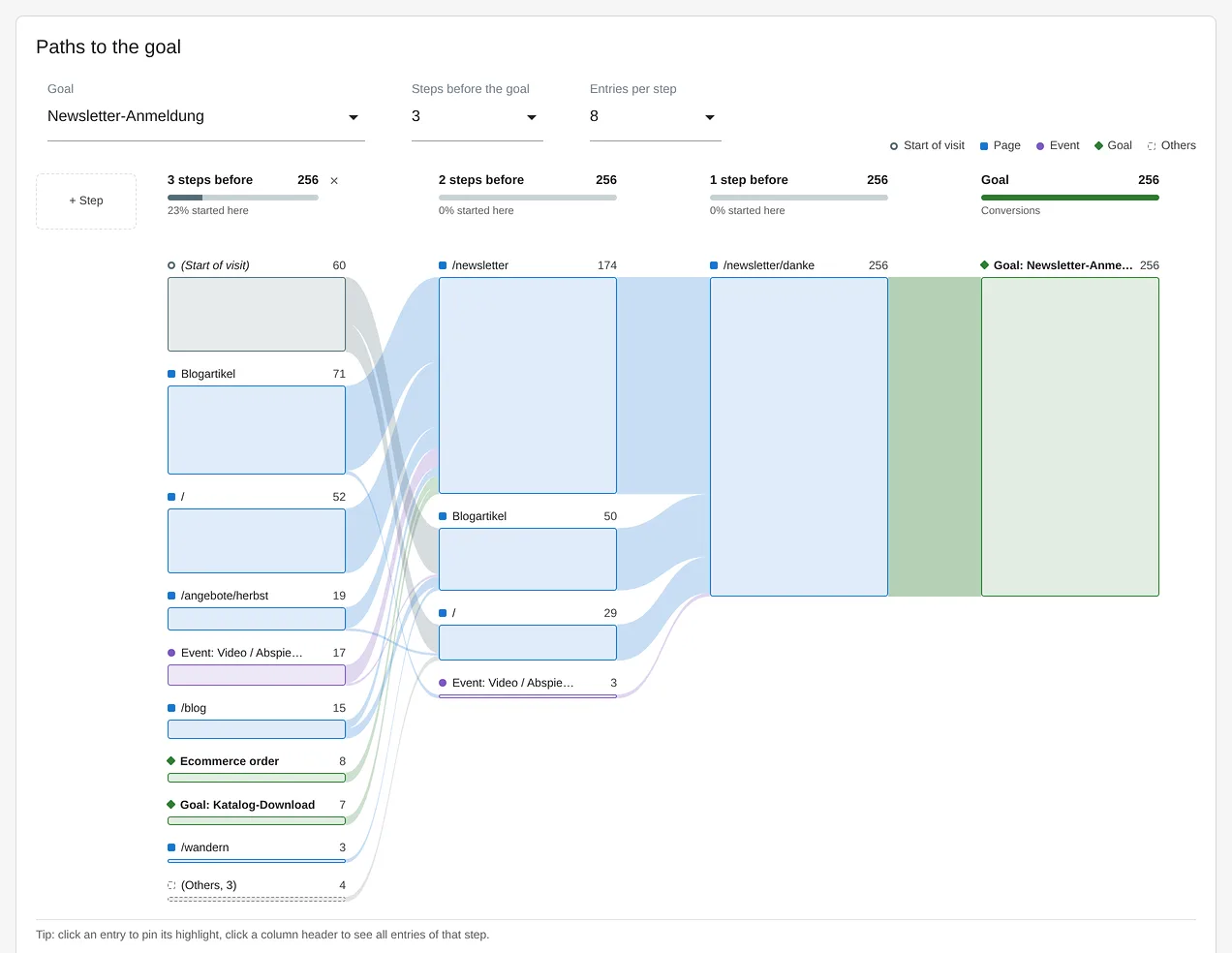
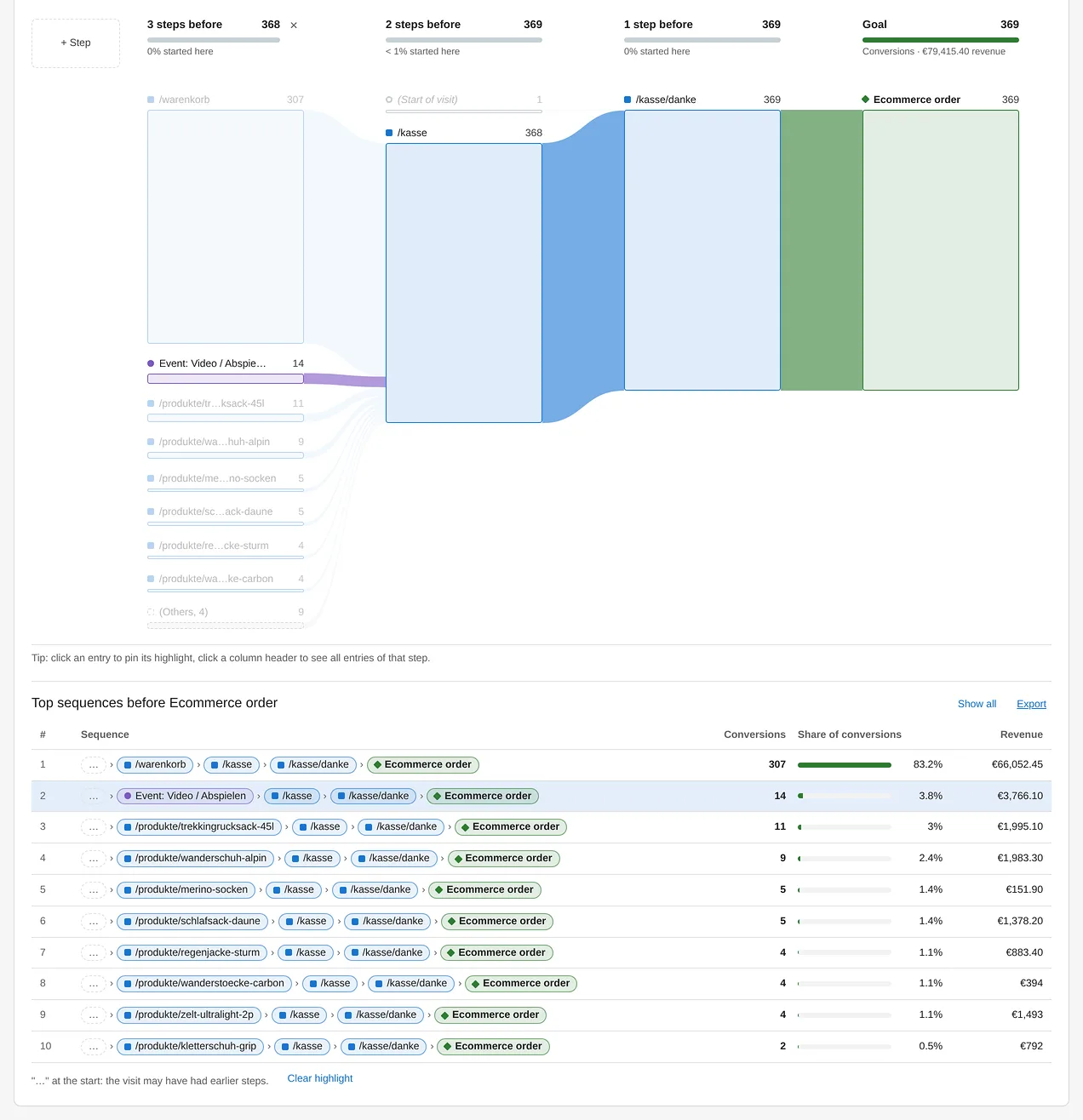
Under Behaviour → Visit Journey, pick a goal or the ecommerce order in Paths to the goal. Working backwards from the goal, the flow chart shows the last steps before every conversion, with pages, enabled events and other goals. Below it you find the Top sequences before the goal: the most frequent sequences with conversions, share and revenue. A click on a sequence highlights exactly that path in the chart. That gives you a funnel for every goal, built from the paths buyers and prospects actually took, without defining the steps up front.
Every conversion counts
Paths to the goal count every conversion individually on its own day, like the Goals report, with its revenue.
Right at the goal
The widget appears on the page of every goal and on the ecommerce overview, with the goal fixed.
Many goals, one dashboard
From eight goals on, the goal picker has a search field, and on a dashboard every widget keeps its own goal.
Together with channels and ad platforms
Which channel brought a buyer is shown by ChannelGrouping, also by last non-direct touch and by first touch. The Conversions API reports the conversions themselves server-side to Google Ads, Meta and LinkedIn. VisitJourney adds the question of which steps on your website came in between. How to analyse the paths from the entry page is shown in the use case Path analysis in Matomo.
How it works in four steps
- Create goals. Set up goals such as contact enquiry, newsletter sign-up or catalogue download as usual under Goals → Manage Goals. For shops with ecommerce, orders count automatically.
- Open the paths to a goal. On the goal's own page under Goals, for orders under Ecommerce → Overview, or under Behaviour → Visit Journey. Set at the top how many steps before the goal you want to see.
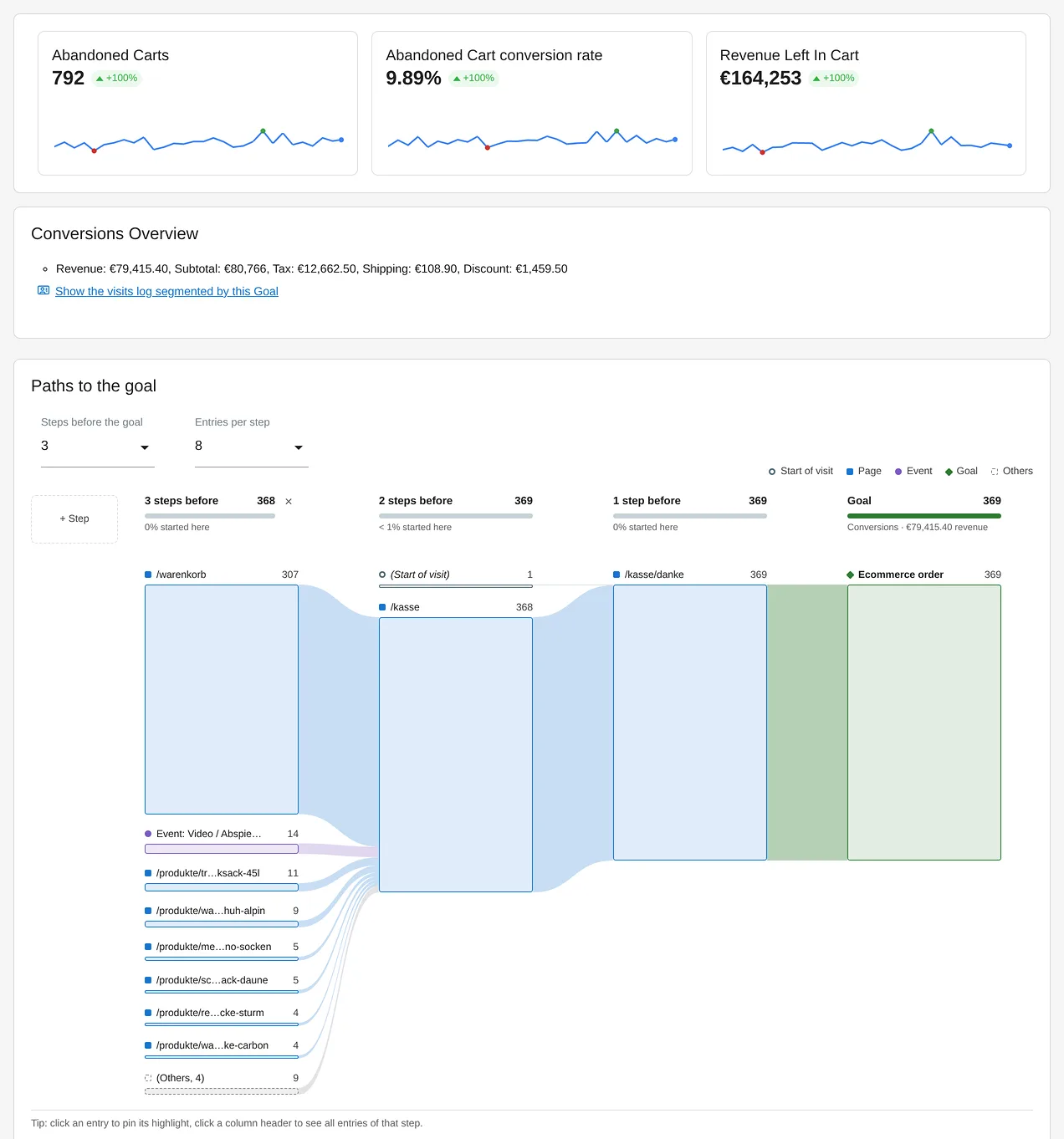
VisitJourney: paths to the goal right on the ecommerce overview and every goal's page - Click a sequence. A click on a row of the top sequences highlights the path in the chart. The tooltip shows how many conversions came through a step and what share that is.
- Add it to a dashboard. The paths to the order next to the paths to the contact enquiry: every widget keeps its own goal, steps and entries. Two to three steps fit a half-width dashboard column.
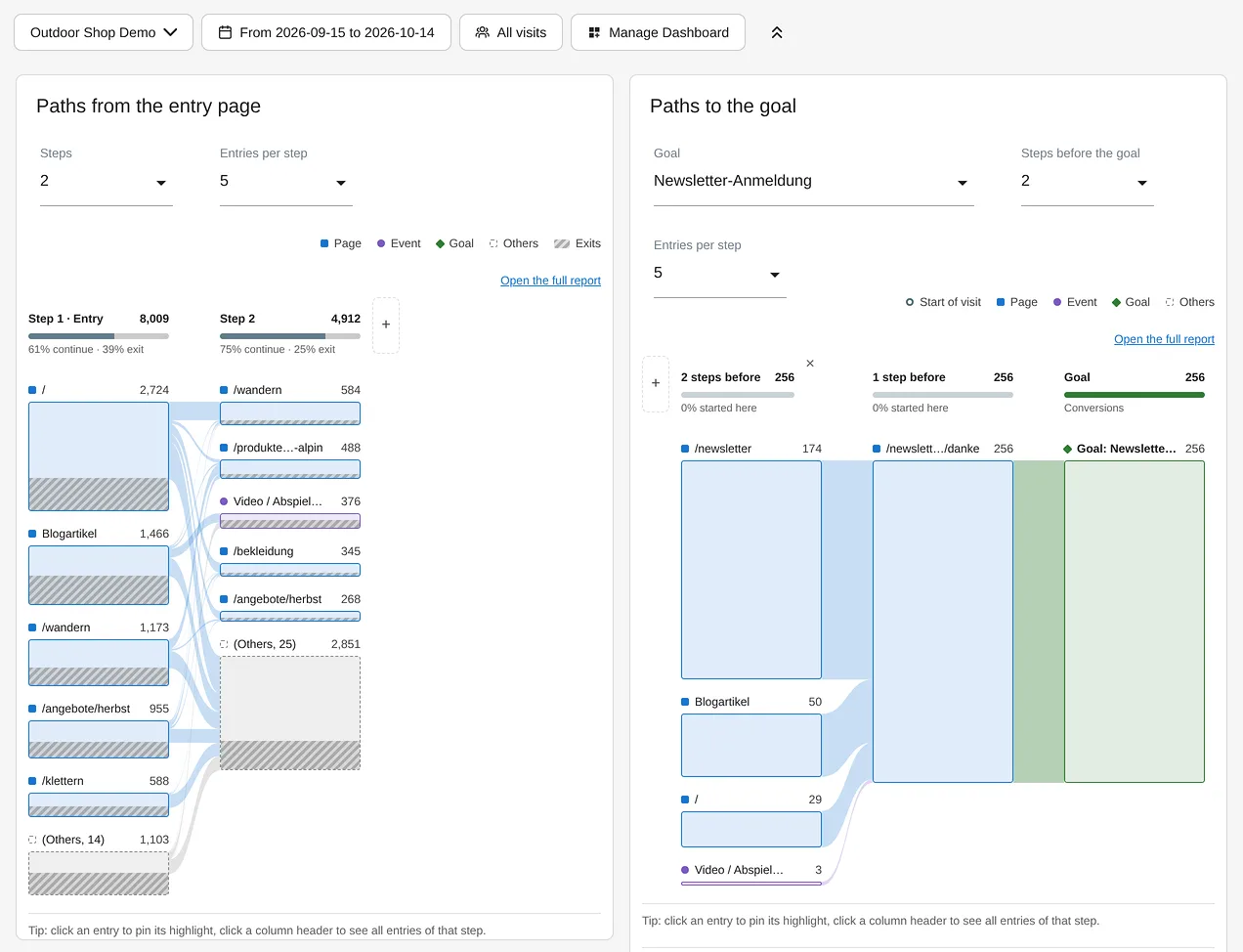
VisitJourney: both reports as dashboard widgets, each with its own settings
Every setting and every step is described in the VisitJourney documentation.
Who it is for
Shops
that want to see which paths via category, product and basket lead to an order.
B2B and lead generation
with goals such as contact enquiry, consultation booking or catalogue download.
Publishers and editorial teams
that want to know which articles are read before a newsletter sign-up.
Agencies
that show their clients which pages and content lie on the path to a conversion.
Frequently asked questions
Is this a funnel analysis?
Yes, just without steps defined up front. Paths to the goal shows for every goal and every ecommerce order which steps the conversions came through, also right on the goal's own page and on the ecommerce overview. Paths from the entry page shows per step how many visits continue and how many exit. So you don't have to guess beforehand which pages belong in the funnel: VisitJourney shows the paths visitors actually take.
How is this different from Matomo's goal reports by page?
The goal reports show, for each page, how many conversions happened after it was viewed, and which entry pages convert. VisitJourney shows the order: which steps, in which sequence, came directly before the conversion, events and other goals included.
Does it count conversions or visits?
Every conversion, on its own day, like the Goals report. If Allow multiple conversions per visit is on for a goal, each conversion counts with its own steps before it.
What does "(Start of visit)" mean?
The visit had no earlier step. If two pages lie between "(Start of visit)" and the goal, the visit began with exactly those two pages. If it sits directly before the goal, there was no page view, enabled event or other goal before the conversion, for example with a goal triggered by a download right at the start of the visit.
Does it work for ecommerce?
Yes. If ecommerce is active for the website, the ecommerce order is listed first in the goal picker, with revenue per sequence. Abandoned carts do not count as a goal.
Can a goal be a step before another goal?
Yes. Goals are steps just like pages and events. That way you see, for example, how many orders came after a newsletter sign-up in the same visit.
Can I export the top sequences?
Yes. Export the top sequences before a goal as a CSV file, with column names in your language, and add them to Matomo's email reports. Through the API they are available with the method getTopSequences.