


Secondary dimensions for Matomo: ad hoc analysis on raw data
Combine dimensions and metrics in one table, without creating a report and without waiting for archiving.
Latest v0.1.1 · Matomo ≥ 5.12.0
Secondary dimensions like in Google Analytics
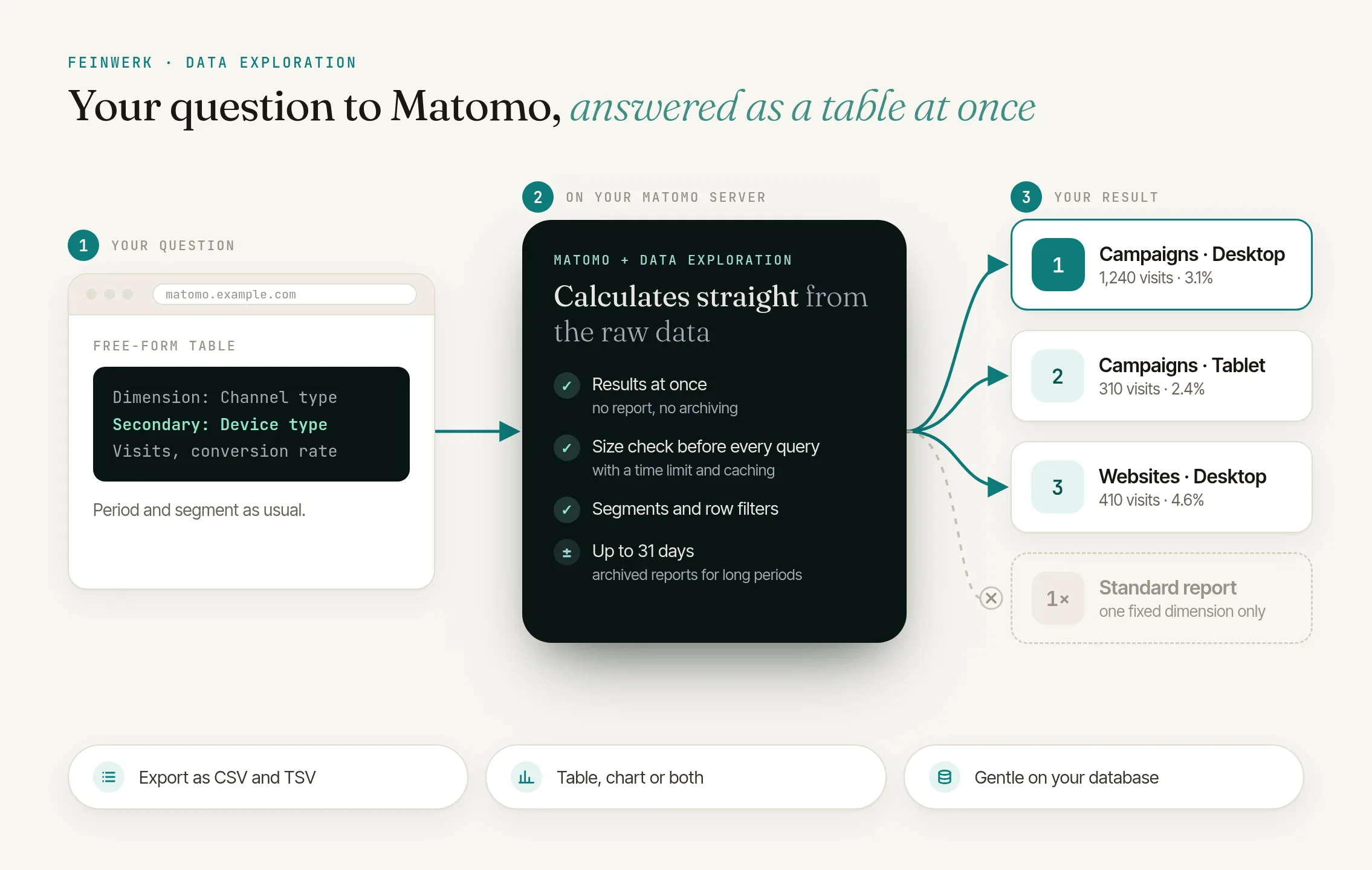
Devices per campaign, events per page, countries per channel: one dimension, a second one and up to five metrics in one table.
Results at once
The table is built straight from the raw data. Nothing to set up, no archiving to wait for.
Table, chart or both
Bars per row or lines over time, with the metric of your choice.
Straight from your reports
The flask icon "Open in exploration" under the standard reports keeps the dimension, period and segment. "Explore this row" opens the visits of a report row, ready to break them down.
A menu on every row
Filter to its value, break it down by a second dimension, or see the visits behind it in the Visits Log.
Gentle on your database
A size check before every query, a time limit, at most two queries at the same time, caching and read replica support.
Click to enlarge
Secondary dimensions and ad hoc tables in Matomo, straight from raw data
Combine a dimension with a secondary dimension and up to five metrics in one table, like GA4's free-form explorations, on your own Matomo data and without creating a report first.
Read the use case →Archived reports are lasting and have a long history. Data Exploration is for questions you ask now or once: no setup, no waiting, at most 31 days, and no report is created.
Explorations read raw data. A month keeps queries fast and protects your database. For long periods, archived reports are the right tool.
Signed-in users with view access to the website. Super users can require a higher role. Anonymous users never use explorations.
The page counts the visits first and warns about large periods. When a period is too large, it offers the most recent days that fit. Queries are stopped at the time limit where the database supports it, and after a slow query the page says what makes it faster: a shorter period, a segment, or a visit dimension instead of pages. Matomo's System Check shows administrators how explorations run on their server.
Yes. With the free Marketing Campaigns Reporting plugin you get campaign source and campaign medium, with Channel Grouping the channel group of every visit.
As CSV or TSV, and every exploration lives in its link. Send it to colleagues who can see the website.
Matomo 5.12 or newer and PHP 8.1 or newer.
-
01
Download the Feinwerk connector and unzip it into your Matomo's
plugins/directory, then activate it. - 02 Open Feinwerk Plugins and click "Connect with Feinwerk account". If your browser cannot reach the store, enter your instance token in the connector settings instead.
- 03 Open the Feinwerk Plugins screen, find Data Exploration, and click Install.
Prefer a manual install? Download the ZIP of version 0.1.1 and install it yourself. Download ZIP · Documentation for Data Exploration
Missing a feature in Data Exploration? Tell us what you need →
Data Exploration
Matomo's reports are archived: fast, but limited to the combinations someone set up in advance. Questions like "which browsers do visitors from our newsletter use?" or "which events happen on which page?" need a secondary dimension or a quick cross table, often just once.
Data Exploration answers them straight from your website's raw data. Pick a dimension, optionally a second one and up to five metrics, and the table is ready. Matomo segments and simple row filters narrow the result, a click on a column sorts it, and the export gives you CSV or TSV.
Dimensions and metrics
Choose from acquisition (channel type, referrer, campaign), visitor (country, region, city, language, visitor type), technology (device type, operating system, browser, screen resolution), time (date, weekday, hour), visit (entry and exit pages) and behaviour dimensions (page URL, page title, events, downloads, outlinks, site search), plus your Custom Dimensions. Metrics cover visits, goals and actions: visits, unique visitors, bounce rate, visit duration, conversions, revenue, pageviews, events and more.
Protection of your Matomo
Every exploration checks the data volume first, stops queries that run too long where the database supports it, runs at most twice at the same time and uses a read replica when one is configured. Data Exploration creates no tables and no reports and changes neither Matomo itself nor other plugins.
Requirements
- Matomo 5.12 or newer
- PHP 8.1 or newer
- Optional: the free Marketing Campaigns Reporting plugin for campaign source and campaign medium, Channel Grouping for the channel group of every visit.
Installation
With one click through the Feinwerk connector or as a ZIP file, see Installing plugins.
License
Free plugin under GPL v3 or later.
-
v0.1.1 Oct 20, 2026
- Long values such as page URLs now wrap in the result table instead of running into the next column.
v0.1.0
- First version: a free-form table with one dimension, an optional second dimension and up to five metrics, straight from the raw data.
- Results as a table, a chart or both, with segments, row filters, sorting and export as CSV or TSV.
- "Open in exploration" under the standard reports and "Explore this row" on their rows.
- A menu on every result row: filter to its value, break it down or see the visits in the Visits Log.
- Protection of your Matomo: a size check before every query, a time limit, at most two explorations at the same time, caching and read replica support.
- An entry in Matomo's System Check, light and dark mode, English and German.