


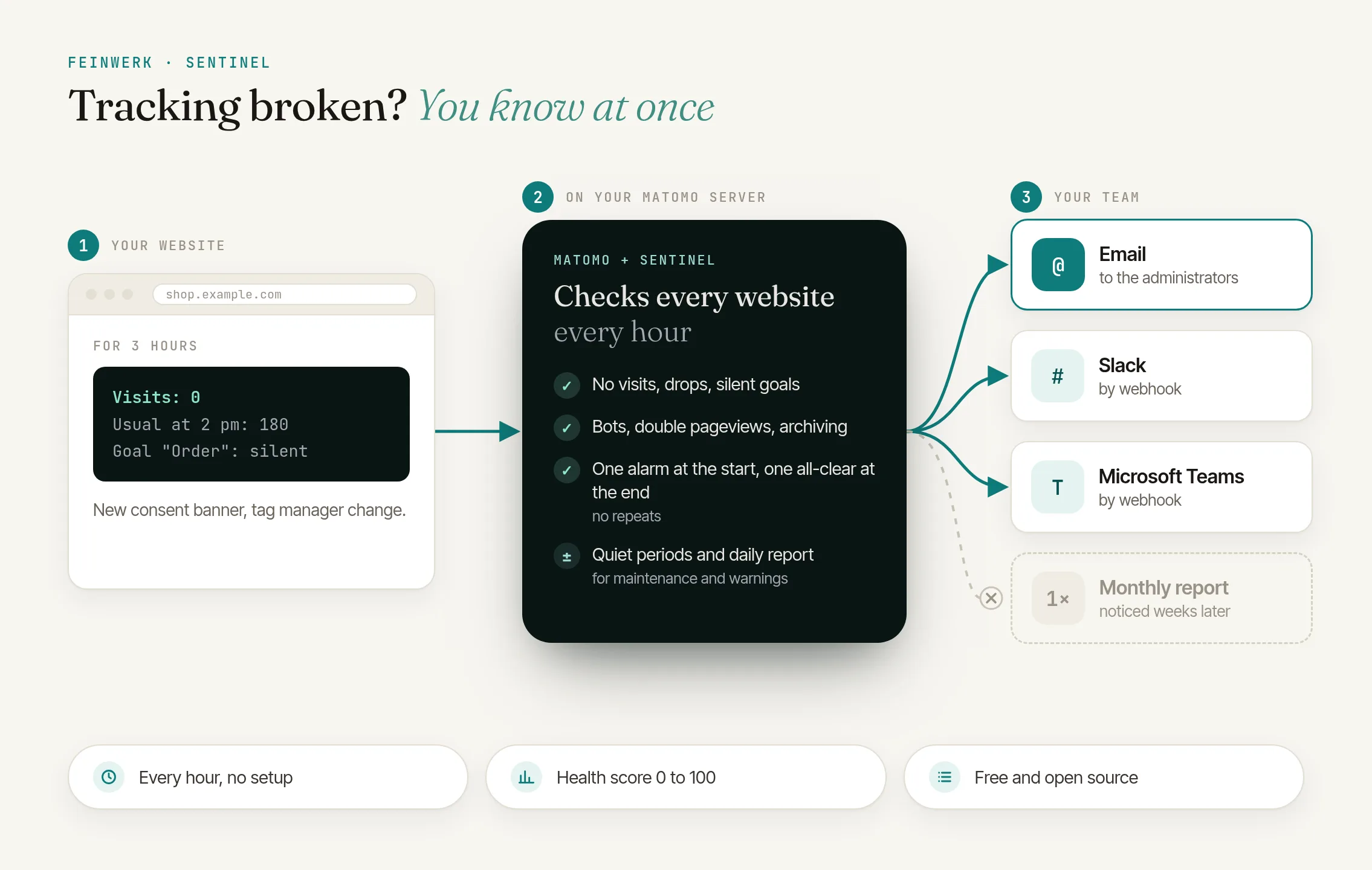
Tracking breaks quietly
A new container is published in the tag manager, the consent banner gets an update, a new release goes live without the tracking code, or the cron job for archiving stops. Matomo reports none of it. Fewer visits simply arrive, a form goal stops recording conversions, or the reports stay stuck on the day before yesterday.
Usually nobody notices until weeks later, when someone opens the monthly report and wonders about the curve. By then the data is already missing, and it cannot be recorded after the fact. Campaigns ran without reliable numbers, and decisions rest on gaps.
Matomo alone
- No warning when visits or conversions stop
- Outages show up in the reports, often weeks later
- Lost data cannot be recovered
With Sentinel
- Every website is checked every hour
- Alarms by email, Slack, Microsoft Teams or webhook
- An all-clear as soon as the data looks normal again
The solution: Sentinel checks every hour
Sentinel compares the data of every website with what is normal for that very website: the median of the same weekday and hour over the last 8 weeks. A quiet night or a Sunday therefore raises no alarm, while a Tuesday afternoon without a single visit does. Because Sentinel reads the raw tracking data rather than the archived reports, late archiving never looks like an outage.
No visits
No visits for some hours (default 3), although the website usually has enough at that time. A critical alarm that goes out immediately.
Drop in visits
A day with far fewer visits than the same weekday usually has, for example when tracking starts for only part of the visitors.
Goal no longer converts
A goal that usually converts, or the orders of an online shop, without a conversion for some days.
Unusual spike (bots, spam)
Far more visits than usual together with signs of bots: a very high bounce rate, very short visits, one dominating country or a new referrer.
Actions per visit off
A sign of pageviews tracked twice or not at all.
Tracking failures and archiving
Matomo rejects tracking requests, or archiving no longer keeps the reports up to date.
Sentinel sends one alarm when a problem starts and one all-clear when it is over, with no repeats in between. When a website gets no visits at all, the follow-up alarms wait instead of flooding your inbox. Warnings can be collected into a daily report, while critical alarms always go out immediately.
How it works in four steps
- Install. Sentinel is free. Install it with one click through the connector or upload the ZIP file in Matomo. From then on it checks every hour with Matomo's scheduled tasks.
- Choose the checks. Under Administration → Diagnostic → Sentinel you decide for each website which checks run and how sensitive they are.
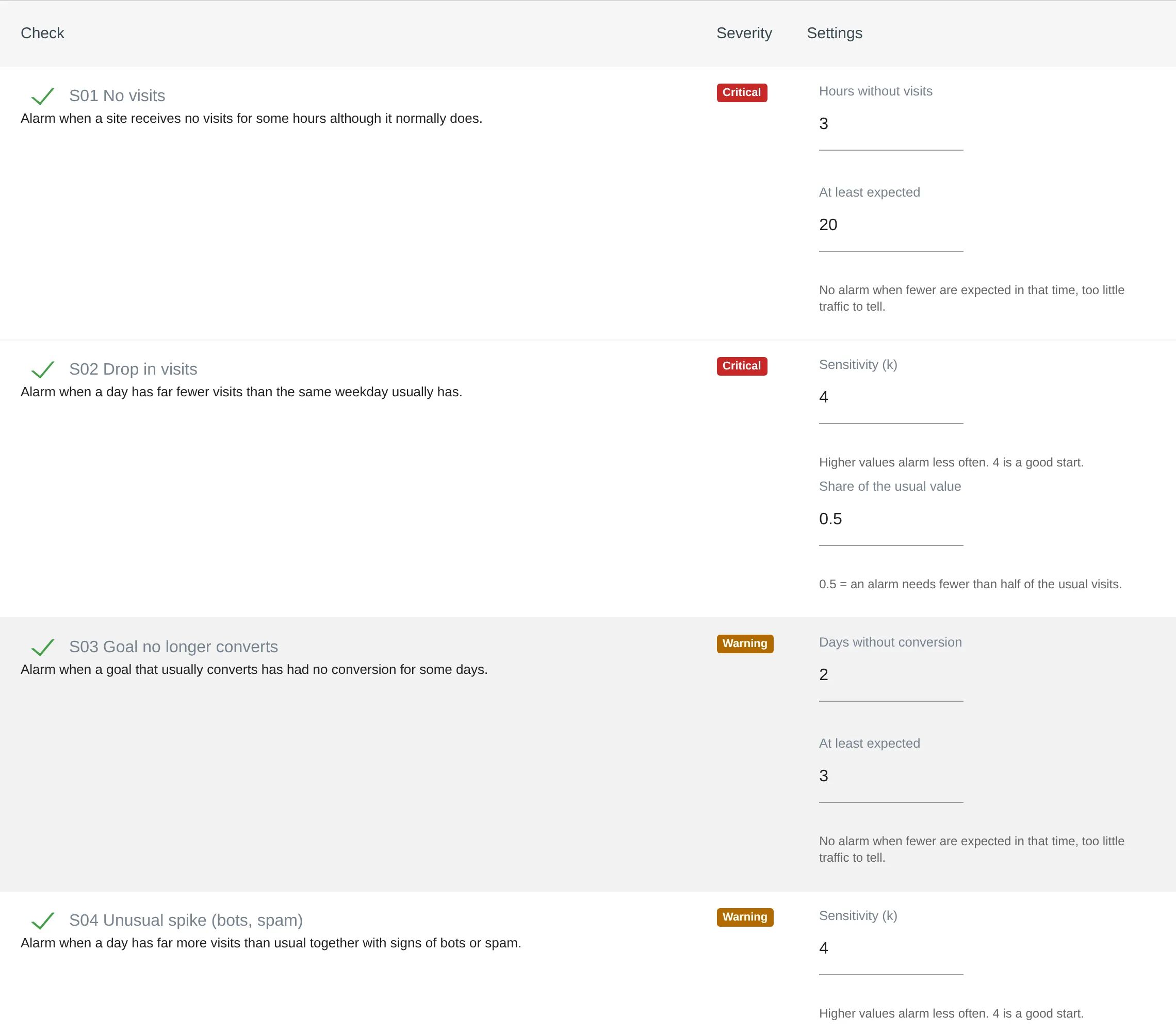
Sentinel's page: switch checks on or off per website and set their thresholds - Add recipients. By default the website's administrators receive the alarms. Add more email addresses and webhooks for Slack, Microsoft Teams or your own system. Quiet periods prevent alarms during planned maintenance, and a test message shows how alarms will arrive.
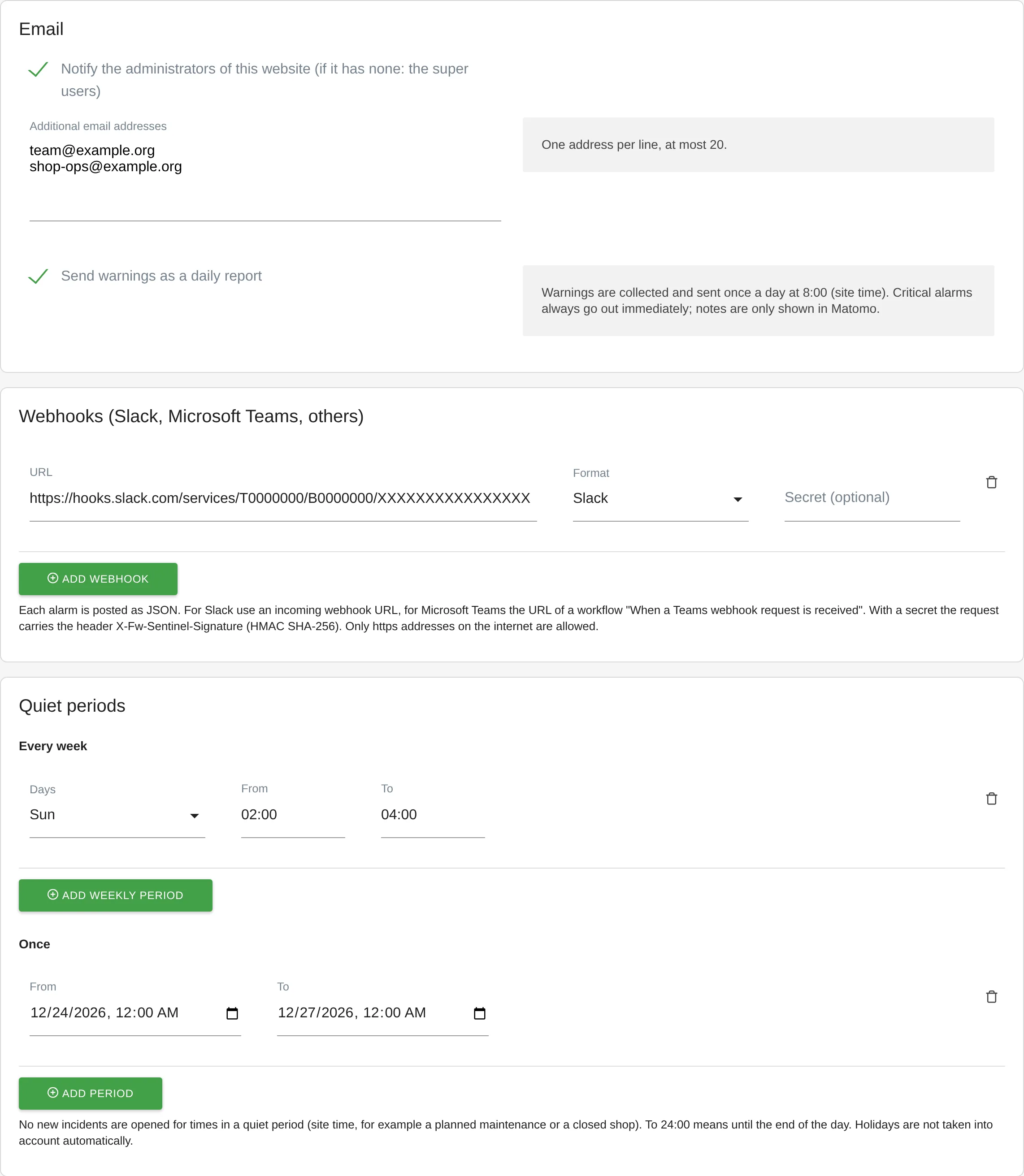
Recipients, webhooks for Slack and Microsoft Teams, and quiet periods on Sentinel's page - Keep an eye on tracking health. Under Visitors → Tracking health you see the health score from 0 to 100, open incidents and the last 30 days, also as a dashboard widget if you like.
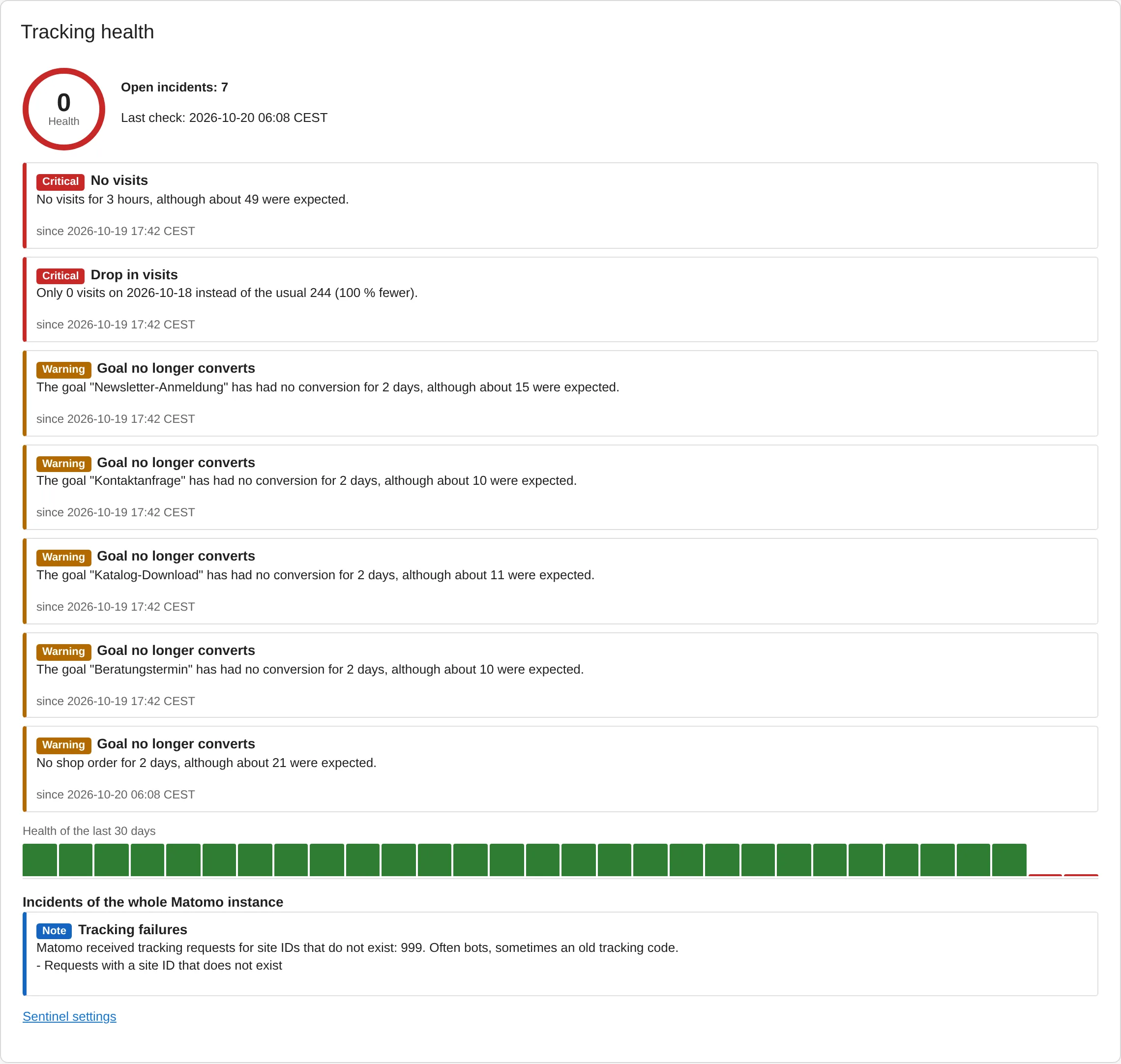
Tracking health widget of a website with a tracking outage: health score, open incidents and the last 30 days
Every setting is described in the Sentinel documentation.
Even sharper with Sentinel Pro
The optional add-on Sentinel Pro sharpens Sentinel's alarms:
Forecasts as expected values
The expected visits of a day come from a forecast that knows trends and seasons, instead of the usual value of the weekday.
Public holidays per website
Germany with its states, Austria, and Switzerland with its cantons. A quiet holiday then no longer counts as a drop.
Channels and conversion rates
An alarm when a single channel drops sharply or the conversion rate of a goal falls although it still converts.
External watchdog
Pro tells Feinwerk regularly that Sentinel is running. If these messages stop for three hours, the owner of the Feinwerk account receives an email.
For the forecasts Sentinel Pro sends only visit counts per day to the Feinwerk forecast service (servers in Germany), without website names, addresses or visitor data. The service computes the forecast in memory and sends it back. It does not store the numbers, keeps no request logs and retains nothing between two requests.
Who it is for
Agencies
who look after many client websites in one Matomo instance and want to spot an outage before the client asks.
Online shops
where a day without recorded orders means wrong numbers for campaigns and revenue.
Marketing and analytics teams
who rely on complete data, especially after a relaunch or a change to the consent banner.
Matomo administrators
who want to know whether archiving and tracking requests keep running reliably.
Frequently asked questions
How quickly does Sentinel report an outage?
Sentinel checks every hour. When visits stop completely, the alarm comes after the configured number of hours without visits (default 3), provided the website usually has enough visits at that time. A goal without conversions is reported after the configured number of days (default 2). Drops, bot spikes and unusual actions per visit are judged for completed days.
Will quiet days cause false alarms?
Sentinel compares every website with itself, weekday by weekday and hour by hour. Statistical checks only start after three weeks of data, websites with very little traffic are not judged, and you set the sensitivity per check. For planned breaks there are quiet periods. Sentinel Pro takes public holidays into account.
Who receives the alarms?
By default the website's administrators (or the super users, if a website has none), each in the language they use in Matomo. Plus up to 20 additional email addresses and up to 5 webhooks per website. Every alarm email has an unsubscribe link, and on Sentinel's page administrators can add people who unsubscribed again.
Is any data sent to Feinwerk or third parties?
Not by Sentinel. It keeps everything in your Matomo database and sends nothing anywhere except the alarms to the email addresses and webhooks you enter. Only the optional Sentinel Pro uses the Feinwerk forecast service for its forecasts, with visit counts per day and no visitor data.
What do I need?
Matomo 5.0 or newer, PHP 8.1 or newer and Matomo's cron job (core:archive) or browser-triggered tasks. Without the cron job, Sentinel runs only when someone opens Matomo. If Sentinel has not run for over two hours, Tracking health shows a hint.
What does Sentinel cost?
Nothing. Sentinel is free and open source (GPL v3 or later). Sentinel Pro is an optional paid add-on.