


Email reports from Matomo that people like to read
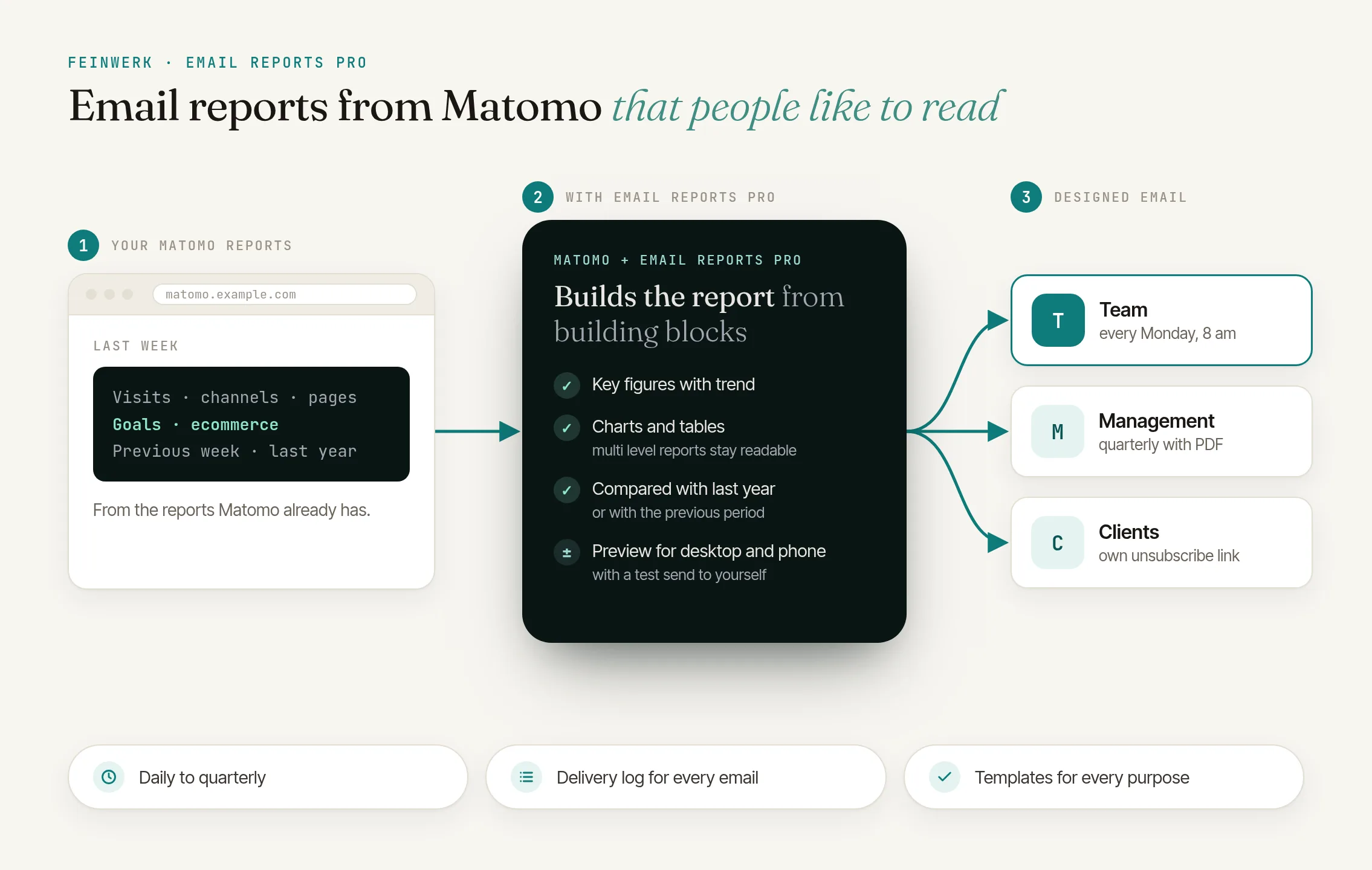
Email Reports Pro turns your Matomo data into designed email reports: key figures with their trend, clear charts and tables that make even multi level reports readable. You put every report together from building blocks and see in the preview how the email arrives.
from €59/month · cancel any time
Latest v1.0.1 · Matomo ≥ 5.0.0
Reports from building blocks
Key figures, trend chart, table, breakdown, biggest changes, heading and text: combine the blocks freely and in any order. Every block has its own Matomo report, its own metrics and, if you like, its own segment.
Comparisons at a glance
Every key figure shows the change against the previous period or the same period last year, coloured by meaning: fewer bounces are green, fewer orders red.
Multi level reports, readable at last
Tables show the top sub rows grouped under each row or one column per level, with bars, totals and an "Others" row. Conversions and revenue per goal can be columns next to them.
Live preview with test send
The preview shows the email the way your recipients see it, on desktop and on a phone. One click sends the current state as a test to your own address.
Sent on schedule
Daily, weekly, monthly or quarterly at the hour you choose in the website's timezone, to Matomo users and external addresses. Every recipient gets an own unsubscribe link, and a PDF version can be attached.
Templates and takeover
Ready templates for a management overview, marketing, content and e-commerce get you started. Existing email reports from Matomo can be taken over as a starting point with one click.
Sharing in the team
Admins of a website share reports with all users of the website or with selected users. They can look at the preview, send a test to themselves and copy the report, without seeing its recipients. Super users see and manage every report.
Light and dark mode
In Matomo's light and dark mode, in English and German, with a delivery log per report.
Click to enlarge
- License for 1 Matomo instance + 3 test instances, all websites and users
- Prices incl. VAT, billed via Paddle
- 14-day trial, cancel before it ends at no cost
- Updates and support included
- Refunds
The weekly report your team actually reads on Monday
Build Matomo reports for email from building blocks, compare with the previous period or last year and send every recipient the report they need.
Read the use case →It comes in addition; your existing reports keep running. You take an existing report over as a template and switch the old one off yourself.
Matomo 5.0 or newer, with PHP 8.1 or newer. For the charts PHP needs the GD extension with FreeType, which almost every installation has.
Through your Matomo's mail setup, like Matomo's own reports. The schedule is run by Matomo's scheduled tasks, so the cron job (`core:archive`) or browser archiving.
Every user sees their own reports and the ones shared with them. Super users see and manage all. Others can look at, test and copy shared reports, but not change them.
They get no more emails from this report. When editing, you see the addresses that unsubscribed and can add them again on purpose. Deleting a report leaves no addresses behind.
Yes, for the whole report or for single blocks. You can pick the segments the owner of the report may see.
Yes. If you like, Email Reports Pro attaches a PDF version to every email.
The license check asks through the Feinwerk Marketplace Connector whether your instance has a license. Below the preview you can tell us whether it is shown correctly. Only when you click there, your Matomo server sends your answer with the plugin and Matomo version, the browser and the interface language to Feinwerk. Report data, recipients or visitor data never leave your Matomo. The feedback can be switched off in the configuration.
-
01
Download the Feinwerk connector and unzip it into your Matomo's
plugins/directory, then activate it. - 02 Open Feinwerk Plugins and click "Connect with Feinwerk account". If your browser cannot reach the store, enter your instance token in the connector settings instead.
- 03 Open the Feinwerk Plugins screen, find Email Reports Pro, and click Install.
Prefer a manual install? After the purchase you will find the ZIP download in your customer account. · Documentation for Email Reports Pro
Missing a feature in Email Reports Pro? Tell us what you need →
Email Reports Pro
Matomo's own email reports are quick to set up, but they look plain: short tables, simple graphics, little design. Multi level reports are hard to read in them, and Matomo alone decides how the email looks.
Email Reports Pro gives you the design back. You put every report together from building blocks: key figures with their trend, trend charts with a comparison line, tables with bars and sub rows, breakdowns as bars or donut, and the biggest changes, plus headings and your own text. The preview shows the email on desktop and on a phone the way your recipients see it.
Compare instead of just report
Every block compares with the previous period or with the same period last year. Changes are coloured by their meaning, and the biggest winners and losers of a report get their own block.
For management, marketing and shops
Templates for a management overview, marketing, content and e-commerce give you a finished report in seconds. Existing email reports from Matomo can be taken over as a starting point.
Sending, recipients and sharing
Reports go out daily, weekly, monthly or quarterly, to Matomo users and external addresses, with an own unsubscribe link for every recipient and a PDF if you like. Admins share reports in the team without revealing the recipients. A delivery log shows every send.
Privacy and transparency
Reports are built entirely in your Matomo; report data and recipients leave your server only as the email to the recipients. The license check asks through the Feinwerk Marketplace Connector whether your instance has a license. Below the preview you can tell us whether it is shown correctly; only then your Matomo server sends your answer with the plugin and Matomo version, the browser and the language to Feinwerk. This feedback can be switched off.
Requirements
- Matomo 5.0 or newer, with PHP 8.1 or newer and the PHP extension GD (with FreeType)
- A working mail setup in Matomo and the cron job (
core:archive) or browser archiving - The Feinwerk Marketplace Connector, connected to your Feinwerk account, and a license for Email Reports Pro
-
v1.0.1 Oct 23, 2026
- More room while you build: on large screens the editor uses more of the width, and the preview shows the email at its own size. Drag the bar between editor and preview (or use the arrow keys) to share the room differently, the width is remembered. When the preview is narrower than the email, it shows the whole email scaled down.
- Email width per report: Standard (640 px) fits every mail program, Wide (800 px) gives tables and charts more room on large screens. On phones both adapt.
- Own preview text for the inbox, the line next to the subject in Outlook and many other mail programs. Without one it starts with the website and names the first two key figures, with nothing of the email appended.
- Logos of any size appear in the header without distortion and in a small file size.
- Editor and preview start at the same height.
- If Matomo does not send an email (emails switched off or blocked by a plugin), the delivery log shows a failed send with the reason.
- The note about removed segments when copying a shared report is shown correctly.
v1.0.0
- First version of Email Reports Pro: designed email reports from key figures, trend charts, tables, breakdowns, biggest changes, headings and text, with a live preview in the editor.
- Every block compares with the previous period or the same period last year; multi level reports show sub rows grouped or one column per level, conversions and revenue per goal as columns.
- Sent daily, weekly, monthly or quarterly to Matomo users and external addresses, each recipient with an own unsubscribe link, with a PDF if you like; delivery log per report.
- Sharing with all users of a website or with selected users, read only and without recipients; super users manage every report.
- Templates for management, marketing, content and e-commerce, and takeover of existing Matomo email reports.