


The Feinwerk Connector is now in the Matomo Marketplace. Install it right inside Matomo, no download, no FTP. Read the news · Here is how →
What happens on your website right now?
Your visitors live: Live Dashboard shows active visitors, pages, sources, goals and a live map, updated every few seconds.
Latest v5.0.1 · Matomo ≥ 5.0.0
Live at a glance
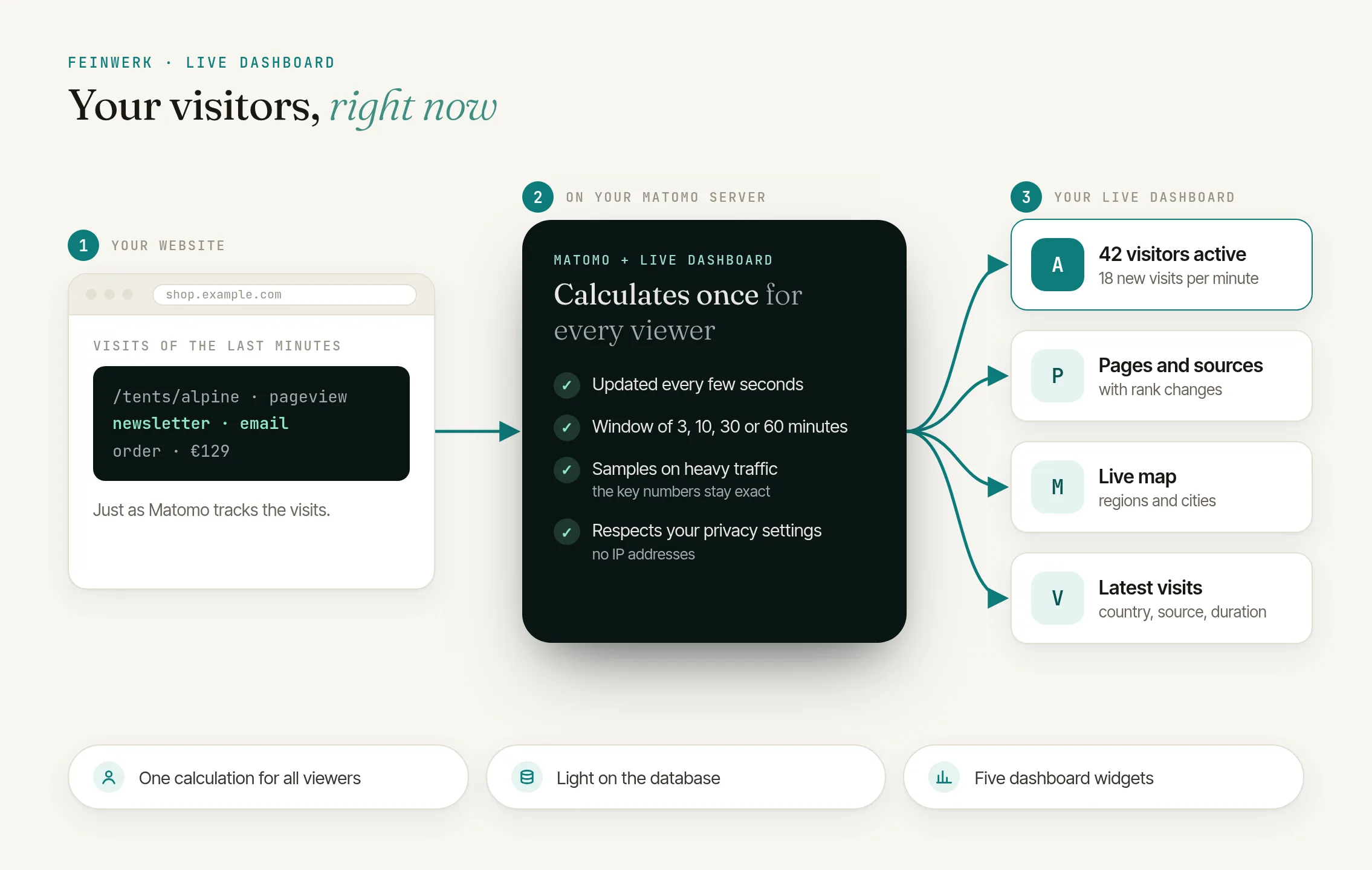
Visitors active now, new visits per minute, pageviews, conversions and revenue, plus today's totals, updated every few seconds.
Your time window
Switch every list and key number between the last 3, 10, 30 or 60 minutes.
Live map with regions
See where your visitors are right now: regions shaded by their visits and the cities at their place on Matomo's country maps.
Five dashboard widgets
Put exactly the part you need on a Matomo dashboard, from the key numbers to the latest visits.
Light on your database
One shared calculation for all viewers, samples on heavy traffic and a time limit for every read keep your Matomo fast.
Respects your privacy settings
No IP addresses, visitor IDs or cities of single visits, and the latest visits follow Matomo's visits log settings.
Click to enlarge
Yes. Live Dashboard is free. Admins and super users see short tips on other Feinwerk offers in Matomo's interface; one line in Matomo's configuration file switches them off.
Under Visitors › Live Dashboard for every website you can view. For your dashboards, add the widgets of the category Live Dashboard.
Visitors active now, the latest visits and the numbers of the last minutes update every 10 seconds, the lists every minute and today's totals every 5 minutes. When the database is busy and numbers get older, the dashboard says how old they are.
Everyone who watches the same website shares one calculation, so ten or fifty viewers cost about as much as one. Every database read has a time limit, and on heavy traffic the lists use a sample. In our load test with 1,000 new visits per minute, 50 viewers needed less than 2 % of one database CPU core, and tracking was not slower.
On very busy websites the lists of the longer time windows are calculated from a sample of the visits and scaled up. The key numbers above them stay exact.
Everybody with view access to a website. The latest visits follow Matomo's own settings: they are hidden when the visits log is switched off for the website or the whole Matomo, or when Matomo rounds report numbers for privacy.
The map shows a city only from 3 visits in the time window, so single visits cannot be traced. Regions and cities also need Matomo's geolocation with a location database.
The time zone of the website in Matomo: today starts at midnight there.
Yes. Full screen on the Live Dashboard page shows the board without Matomo's menus, with the name of the website at the top.
Yes. If your Matomo uses a reader database, Live Dashboard reads from it. For very large instances, the documentation lists the options that reduce the load further.
- 01 Install the Feinwerk Connector from Matomo's Marketplace: under Administration › Platform › Marketplace, search for "Feinwerk", install and activate it. Without the Marketplace: download the ZIP.
- 02 Open Feinwerk Plugins and click "Connect with Feinwerk account". If your browser cannot reach the store, enter your instance token in the connector settings instead.
- 03 Open the Feinwerk Plugins screen, find Live Dashboard, and click Install.
Prefer a manual install? Download the ZIP for your Matomo version and install it yourself: Matomo 6 (v5.0.1) · Matomo 5 (v5.0.1) · Documentation for Live Dashboard
Missing a feature in Live Dashboard? Tell us what you need →
Your website, live
Live Dashboard puts the visits Matomo collects onto one board that updates itself every few seconds: how many visitors are on your website now, how many new visits arrive per minute, which pages they read, where they come from, which goals they reach and what they buy. Numbers that change light up briefly, so on a team screen or during a campaign launch you notice them from the corner of your eye. Choose the time window at the top: every list and key number follows the last 3, 10, 30 or 60 minutes.
Lists, map and latest visits
- Top lists: pages viewed now and top pages (by URL or title), channels, campaigns, countries, device types, goals and orders, events, downloads, outlinks and site search. A small green or red number shows how many places a row moved since the last update.
- Live map: the country with the most visits on Matomo's own country map, its regions shaded by their visits and its cities at their place. Click another country in the list or open the world map.
- Latest visits: the newest visits with country, source, duration and actions, with icons for a reached goal, an order, an abandoned cart and a returning visitor.
- Campaign sources: with the free plugin Marketing Campaigns Reporting, as a list of their own.
On your Matomo dashboards
Five widgets bring exactly the part you need onto a Matomo dashboard: Live: Overview, Live: Pages, Live: Sources and goals, Live: Latest visits and Live: Map. On the page itself, Full screen turns the board into a wall display.
Built for busy websites
Everyone who looks at the same website shares one calculation, so fifty viewers cost about as much as one. On heavy traffic the lists switch to a sample while the key numbers stay exact, every database read has a time limit, and when the database is busy the dashboard calculates less often by itself and shows how old its numbers are. Today's totals are counted only for the minutes since the last update. In our load test with 1,000 new visits per minute, 50 people watching needed less than 2 % of one database CPU core, and tracking stayed as fast as without them.
Privacy
Live Dashboard follows your Matomo settings: the latest visits appear only when the visits log is switched on and Matomo does not round report numbers, and the board never shows IP addresses, visitor IDs or the city of a single visit. A city appears on the map from 3 visits in the time window.
-
v5.0.1 Nov 19, 2026
- New pictures for the Matomo Marketplace: the whole Live Dashboard on one page and every widget in its full width.
v5.0.0
- First stable version of Live Dashboard for Matomo 5 and Matomo 6.
- See live what happens on your website: active visitors, new visits per minute, pages, sources, goals and orders, for the last 3, 10, 30 or 60 minutes.
- Live map with regions and cities on Matomo's country maps.
- Five widgets for your Matomo dashboards: overview, pages, sources and goals, latest visits and map.
- Light on the database, also on busy websites: all viewers share one calculation, and today's totals are counted only for the minutes since the last update.