


The Feinwerk Connector is now in the Matomo Marketplace. Install it right inside Matomo, no download, no FTP. Read the news · Here is how →
Every campaign link built right
Campaign Manager builds campaign links right in Matomo, checks them while you type, keeps every link in one list for your team and shows each campaign with its goal and progress.
Latest v5.0.1 · Matomo ≥ 5.0.0
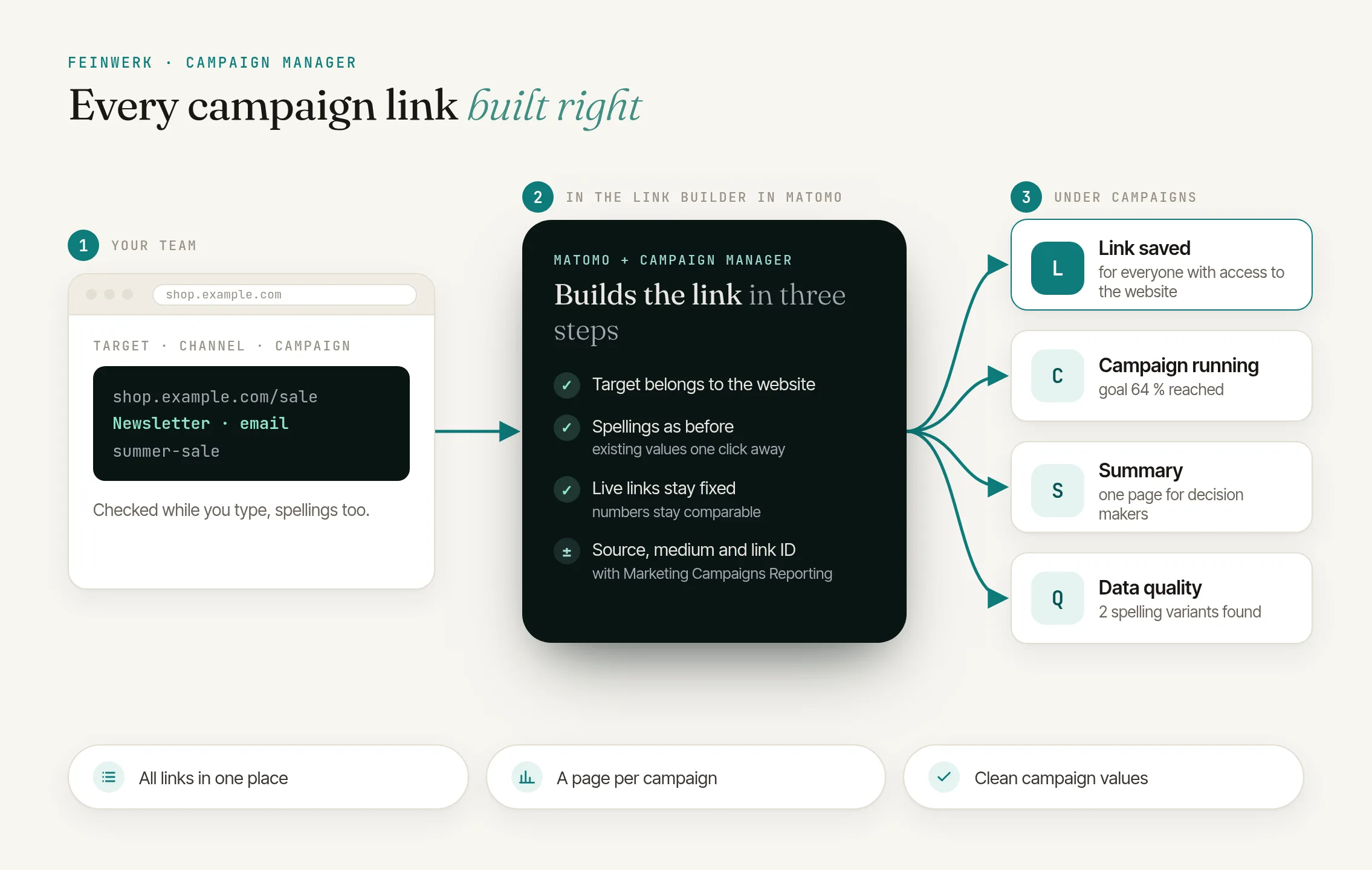
A link in three steps
Choose target, channel and campaign; source and medium come from the channel, and the link is ready to copy at once.
Checked while you type
Hints on values Matomo would not store, on duplicate link IDs and on spellings that are almost the same as an existing one.
One list for the team
Every saved link of a website with search, status, visits and conversions; nothing is deleted.
Campaigns with a goal
A period, a goal and notes per campaign, the overview by phase and a page of its own with progress and result.
Data quality at a glance
Spelling variants that Matomo counts separately and campaign values without a saved link, each one click from a new link.
Free and in your Matomo
All links and details stay in your Matomo database, for Matomo 6 and Matomo 5 in five languages.
Click to enlarge
Build every campaign link right and find it again
One typo in a link, and Matomo counts a campaign twice. Campaign Manager builds every link in Matomo itself, checks it while you type and keeps all links in one list for the whole team.
Read the use case →Matomo counts campaigns once visits with campaign parameters arrive. Campaign Manager helps before and after that: it builds consistent links, saves them for the whole team and gives each campaign a period, a goal and notes. The overview shows all campaigns by phase with goal progress, and the data quality page finds spelling variants that Matomo counts as separate campaigns.
All visits, conversions and revenue come from Matomo's own campaign report and, when active, from Marketing Campaigns Reporting. Campaign Manager reads the archived reports, so the usual archiving by cron job is enough.
No, Campaign Manager works without it. With that free plugin, Matomo also stores source, medium, content, group, placement and a link ID, so each saved link is counted on its own. Without it the links of a campaign share their numbers, which is why the overview recommends the plugin.
A new link is a draft and can change freely. It is live once you mark it live, its first day of use is reached or Matomo counts its first visit; from then on its target and campaign values stay, so its numbers stay comparable. After its last day of use it is ended.
Saved links and campaign details stay in your Matomo database. Campaign Manager sends nothing to the Feinwerk Campaigns platform; the only thing that leaves your Matomo is a feedback vote when someone clicks a thumb.
Matomo 5.0 or later and Matomo 6, light and dark mode, in English, German, French, Spanish and Italian. With view access to a website you can build and copy links and see the numbers; saving and changing them needs write access.
- 01 Install the Feinwerk Connector from Matomo's Marketplace: under Administration › Platform › Marketplace, search for "Feinwerk", install and activate it. Without the Marketplace: download the ZIP.
- 02 Open Feinwerk Plugins and click "Connect with Feinwerk account". If your browser cannot reach the store, enter your instance token in the connector settings instead.
- 03 Open the Feinwerk Plugins screen, find Campaign Manager, and click Install.
Prefer a manual install? Download the ZIP for your Matomo version and install it yourself: Matomo 6 (v5.0.1) · Matomo 5 (v5.0.1) · Documentation for Campaign Manager
Missing a feature in Campaign Manager? Tell us what you need →
Clean links before the data exists
Matomo counts every spelling of a campaign value as a campaign of its own. "Newsletter", "news-letter" and "newsleter" become three rows in the report, a forgotten parameter sends visits to "Direct entry", and numbers once counted cannot be merged afterwards. That is why Campaign Manager starts earlier: it builds every link in Matomo itself, in the spelling your team already uses.
What Campaign Manager does
- Link builder: target, channel and campaign in three steps. Source and medium come from the channel, existing values are one click away, and the link is checked while you type: the website's address, values Matomo would not store, duplicate link IDs and spellings that are almost the same as an existing one.
- Saved links: one list for everyone with access to the website, with search, copy, edit and archive, and the visits and conversions of each link. A link is a draft, live or ended; once it is live, its values stay.
- Campaigns: a period, a goal (visits, conversions or revenue) and notes per campaign. The overview shows every campaign by phase with goal progress, each campaign has a page of its own with preparation, progress and result, and a summary for decision makers to print.
- Data quality: spelling variants that Matomo counts separately, with the recommended spelling, and campaign values without a saved link.
Good to know
The numbers come from Matomo's archived campaign reports. With the free Marketing Campaigns Reporting plugin Matomo also stores source, medium, content and a link ID, so each link is counted on its own. Saved links and campaign details stay in your Matomo database. Everything the pages do is also available through Matomo's HTTP API, for example for scripts and AI assistants.
-
v5.0.1 Nov 25, 2026
- Campaign Manager is now also on the Matomo Marketplace, with screenshots and answers to frequent questions.
- The plugin's website link in Matomo leads to its page on plugins.feinwerk.io.
v5.0.0
- Build campaign links in three steps: target, channel and campaign. The link is checked while you type, also against spellings you already use.
- All links in one place, for everyone with access to the website: search, copy, edit, archive, with the visits and conversions of each link.
- Draft, live, ended: a link changes freely until it is live. Then its values stay, so its numbers stay comparable.
- An overview of all campaigns by phase with goal progress and warnings, plus a page per campaign with preparation, progress and result and a summary for decision makers to print.
- Data quality: spelling variants that Matomo counts as separate campaigns, and campaign values without a saved link.
- Recommends the free plugin Marketing Campaigns Reporting for numbers per source, medium and link.
- For Matomo 5 and Matomo 6, light and dark mode, in English, German, French, Spanish and Italian.